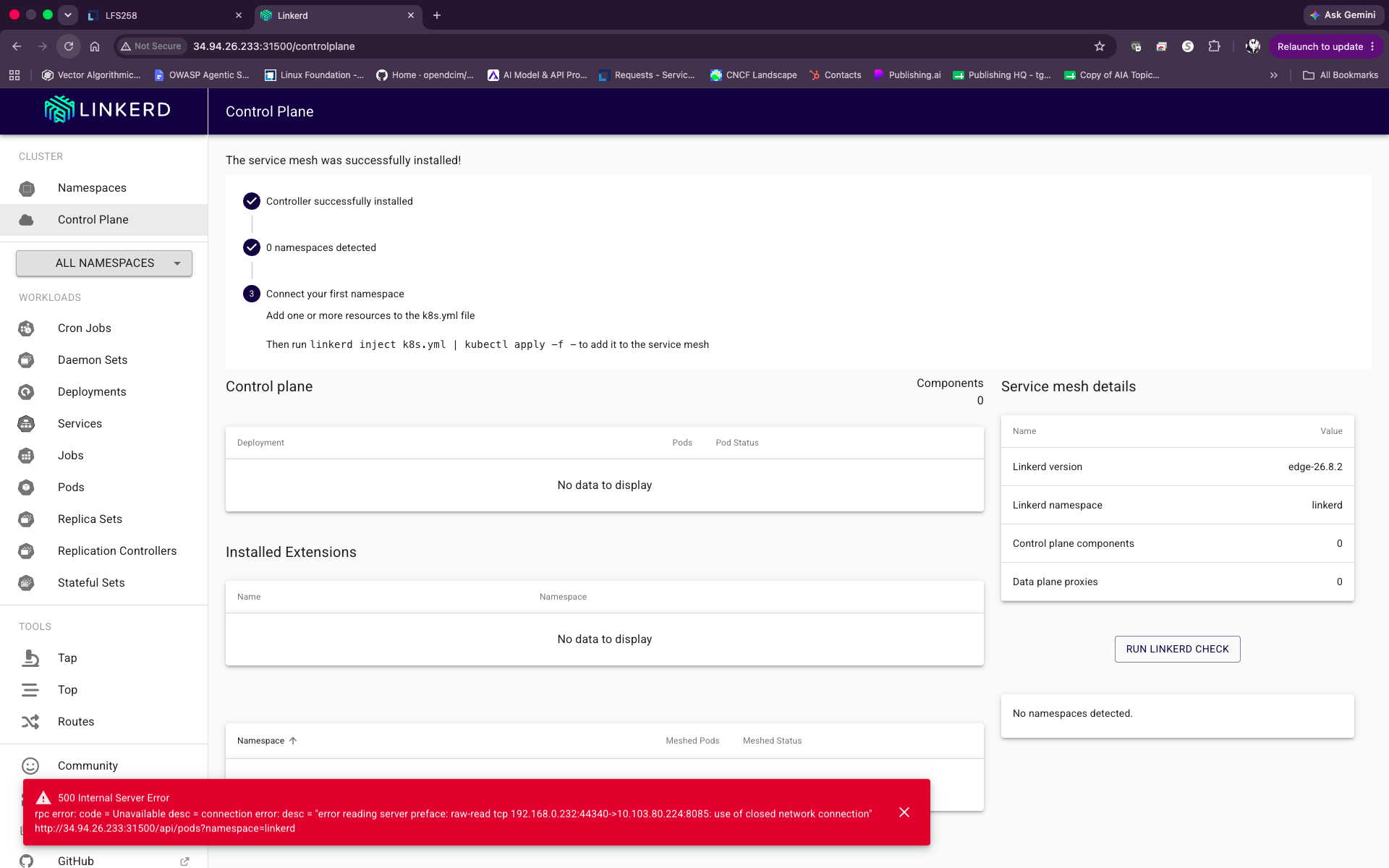
500 Internal Error message when connecting to LINKERD.

500 Internal Server Error
rpc error: code = Unavailable des = connection error: des= "error reading server preface: raw-read top 192.168.0.232:44340->10.103.80.224:8085: use of closed network connection"
Comments
-
Hi @Todd Gill,
What course/step produces this behavior? Are all installation, configuration, and injection steps followed as presented in the lab guide prior to this error?
Regards,
-Chris0 -
Yes, all the steps were followed and I had everything working.
I am on GCP, and after each lesson, I need to suspend the VMs to keep costs down.
I think something happened after I restarted the VMs.1) I checked the linkerd process running , killed it and tried restarting it .. but didn't work.
student@cp:~$ ps aux | grep linkerd
2103 946647 0.0 0.6 1320680 50524 ? Ssl Aug24 0:30 ./web -linkerd-metrics-api-addr=metrics-api.linkerd-viz.svc.cluster.local:8085 -cluster-domain=cluster.local -controller-namespace=linkerd -log-level=info -log-format=plain -enable-pprof=falseI am connecting at : http://34.94.26.233:31500/namespaces
I can view the webpage, but it still flashes the 500 Internal Server Error at the bottom of the page.
0 -
A 500 Internal Server Error
rpc error: code = Unavailable des= connection error: des= "error reading server preface: raw-read top 192.168.0.232:44322->10.103.80.224:8085: use of closed network connection"
http://34.94.26.233:31500/api/tps-reports?resource_type=namespace&namespace=all&tcp_stats=true&window=1m0 -
Hi @Todd Gill,
Perhaps answering these questions would help:
- What course is this?
- Which Lab exercise and which Step number is attempted when this behavior is observed?
Regards,
-Chris0 -
Kubernetes Fundamentals (LFS258)
Lab 11.2. Ingress Controller
Step one wants you to create two deployments in the default namespaces, which I did using
lesson : Lab 10.1. Deploy a New Service. , two deployments of nginx.0 -
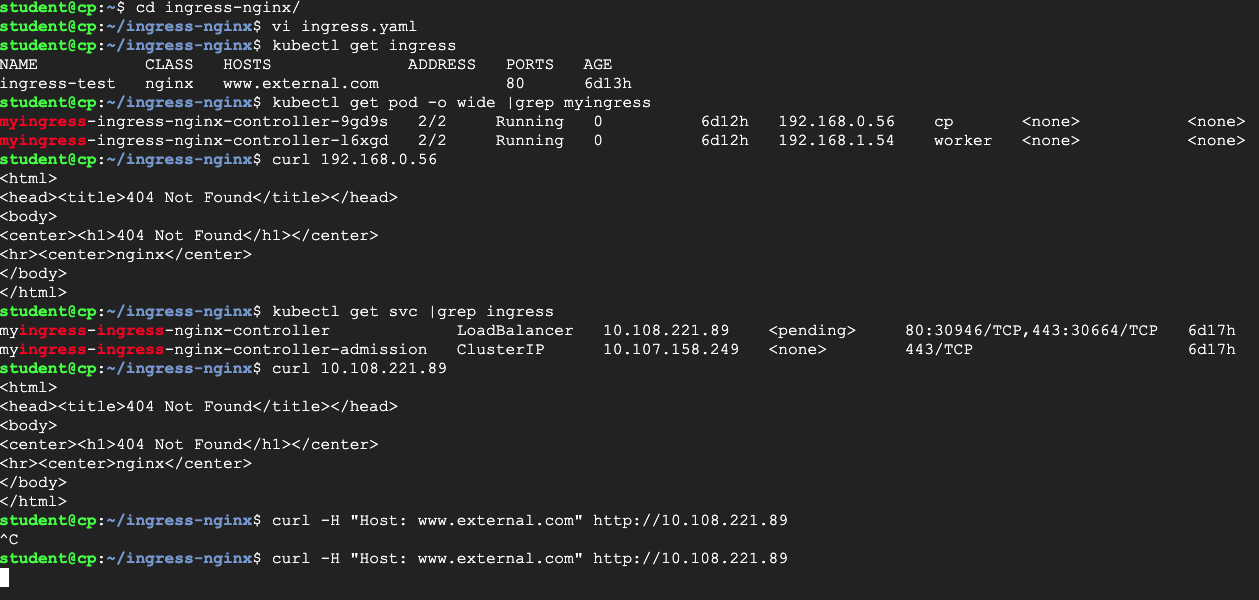
I am currently in this step and the VM is hanging .....
 0
0 -
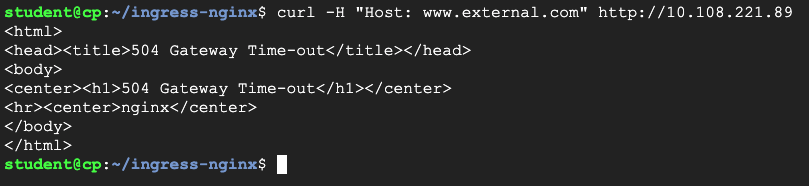
After it times out .... it returns a 504 error.....
 0
0 -
Hi @Todd Gill,
With the introduction of the hosted lab environment for LFS258 we highly recommend using it to practice the hands-on lab exercises.
Since the service mesh seems to be the one impacted, I'd recommend to revisit the web deployment and the linkerd-viz service configurations and validate the initial configuration edits were preserved between GCE instances restarts. Check for linkerd viz dashboard instances that may be running redundantly in the background - ensure a single dashboard background process exists.
If the service mesh stops you from making progress, you can completely uninstall linkerd and re-install and reconfigure it.
Also, check the state of your cluster, to ensure your nodes are ready and all application pods are running. Check for a network policy resource - remove it if it exists.
Regards,
-Chris0 -
Hi Chris,
Thank you for the checklist. My cluster control plane pods are all "Running" and in a good state.
The nodes are also "Ready".I took your advice to uninstall Linkerd, but even that was a web of "Uninjections" and finally deleting the namespace with the pods that needed to be "Uninjected". After that, I was able to run :
linkerd uninstall | kubectl delete -f - ..... and delete the control plane and then commands to delete ingress controller using :
helm list -A
helm uninstall-n Now, I am back to ground 0 and ready to rebuild the ingress controller with linkerd service mesh.
I totally get what you mean by using the hosted lab environment, it would save me a lot of time and headaches. However, I have learned so much more breaking and fixing things.
 This time I won't suspend my cluster in GCP until I can better understand linkerd's GUI structure.
I'll be starting the lab again, soon. Thank you for the help!
Regards,
Todd
0 -
Hi @Todd Gill,
I do see the learning advantage when you control the environment.
Keep in mind that while the service mesh is used to monitor the traffic of the "injected" applications, it is not a requirement for the ingress exercise. The ingress exercise can be completed independently of the service mesh exercise, but without the web UI to validate traffic sources and destinations (and by simply skipping the few "inject" commands throughout the ingress exercise).
Regards,
-Chris0

Categories
- All Categories
- 179 LFX Mentorship
- 179 LFX Mentorship: Linux Kernel
- 776 Linux Foundation IT Professional Programs
- 384 Cloud Engineer IT Professional Program
- 175 Advanced Cloud Engineer IT Professional Program
- 76 DevOps IT Professional Program - Discontinued
- 7 DevOps & GitOps IT Professional Program
- 103 Cloud Native Developer IT Professional Program
- 7.7K Training Courses & Learning Paths
- 21 AI & ML Training
- 2 Blockchain & Decentralized Identity Training
- 49 Cloud & Containers Training
- 7 Cybersecurity Training
- 5 DevOps & Site-Reliability Training
- 3 Linux Kernel Development Training
- 3 Networking Training
- 2 Open Source Best Practice Training
- 7 System Administration Training
- 1 System Engineering Training
- 6 Web & Application Development Training
- 798 Hardware
- 202 Drivers
- 68 I/O Devices
- 37 Monitors
- 96 Multimedia
- 173 Networking
- 91 Printers & Scanners
- 92 Storage
- 776 Linux Distributions
- 83 Debian
- 68 Fedora
- 25 Linux Mint
- 13 Mageia
- 24 openSUSE
- 151 Red Hat Enterprise
- 32 Slackware
- 13 SUSE Enterprise
- 356 Ubuntu
- 473 Linux System Administration
- 31 Cloud Computing
- 73 Command Line/Scripting
- Github systems admin projects
- 104 Linux Security
- 79 Network Management
- 102 System Management
- 46 Web Management
- 185 Mobile Computing
- 32 Android
- 137 Development
- 1.2K New to Linux
- 1K Getting Started with Linux
- 407 Off Topic
- 128 Introductions
- 35 Study Material
- 1.1K Programming and Development
- 312 Kernel Development
- 732 Software Development
- 1K Software
- 421 Applications
- 183 Command Line
- 5 Compiling/Installing
- 71 Games
- 320 Installation
- Archived
- 183 Small Talk
- 2 LFD140 Class Forum
- 1.4K LFS258 Class Forum
Upcoming Training
-
August 20, 2018
Kubernetes Administration (LFS458)
-
August 20, 2018
Linux System Administration (LFS301)
-
August 27, 2018
Open Source Virtualization (LFS462)
-
August 27, 2018
Linux Kernel Debugging and Security (LFD440)