Lab 29.2. Centralized Authentication Using LDAP and TLS...?

Hi Luis,
i have installed the LDAP-server on a VM and it is running...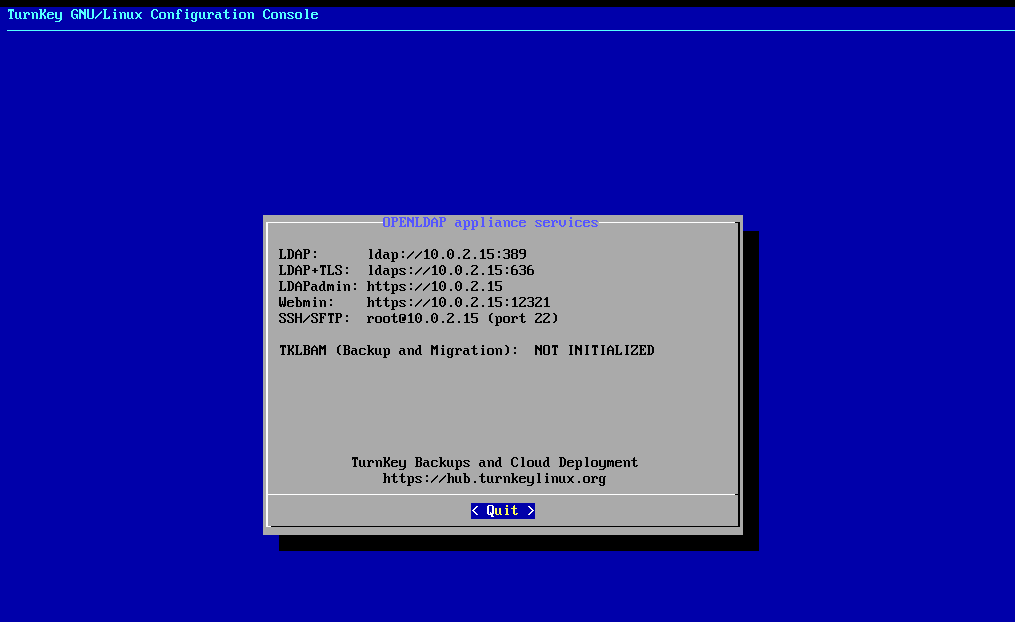
then i followed the instrcutions but this sentence i would love to be explained in detail:
It is assumed that the
ready-for.sh
script has been run, the solutions and resource files loaded and extracted to a directory
...however i went on with installing openldap-clients packages, then i wanted to...
ldapsearch -x -H ldap://10.0.2.15.-b "dc=example,dc=com" -s sub"objectclass=*"
but the bash responded:
ldap_sasl_bind(SIMPLE): Can't contact LDAP server (-1)
i would love go on with the exercise...maybe you have a hint for a solution?
Thanks!
regards
berni
Best Answers
-
Hi Berni,
It looks like a networking issue. So let's take a look from that point of view:
1.- See what's the client IP. In my case:
luis@debiansrv:~$ ip a
1: lo: <LOOPBACK,UP,LOWER_UP> mtu 65536 qdisc noqueue state UNKNOWN group default qlen 1000
    link/loopback 00:00:00:00:00:00 brd 00:00:00:00:00:00
    inet 127.0.0.1/8 scope host lo
       valid_lft forever preferred_lft forever
    inet6 ::1/128 scope host noprefixroute
       valid_lft forever preferred_lft forever
2: enp0s3: <BROADCAST,MULTICAST,UP,LOWER_UP> mtu 1500 qdisc fq_codel state UP group default qlen 1000
    link/ether 08:00:27:e4:93:87 brd ff:ff:ff:ff:ff:ff
    altname enx080027e49387
    inet 192.168.1.27/24 brd 192.168.1.255 scope global dynamic noprefixroute enp0s3
       valid_lft 2520sec preferred_lft 2520sec

It's 192.168.1.27.
2.- The IP of the LDAP Server in my case is 192.168.1.246 (so both systems are in the same network), and both ports 389 and 636 should be listening.
3.- Let's ping the LDAP Server -if your setup permits it:
luis@debiansrv:~$ ping 192.168.1.246
PING 192.168.1.246 (192.168.1.246) 56(84) bytes of data.
64 bytes from 192.168.1.246: icmp_seq=1 ttl=64 time=0.901 ms
64 bytes from 192.168.1.246: icmp_seq=2 ttl=64 time=0.951 ms
^C
That's ok.
4.- Let's try the ldapsearch command:
luis@debiansrv:~$ ldapsearch -x -H ldap://192.168.1.246 -b "dc=example,dc=com" -s sub"objectclass=*"
# extended LDIF
#
# LDAPv3
# base <dc=example,dc=com> with scope subtree
# filter: (objectclass=*)
# requesting: ALL
#

# example.com
dn: dc=example,dc=com
objectClass: top
objectClass: dcObject
objectClass: organization
o: example.com
dc: example
[...]
That works

So check the network on your side and let me know.
Regards,
Luis.0 -
Hi Berni,
1.- Let's try with nc to the LDAP IP and port. You need to do the following from the client:
nc -zv $IP 389
Replace $IP with your LDAP server's IP.
If the command succeed, you should see something like this:
Connected to 10.0.2.15:389.
Note: I can't put the command because some strings are filtered by the forum software.
2.- You also can connect to the LDAP server by ssh and use the 'ss' tool to see if the port is listening, as here. Important note: never connect by ssh with the root account. This is only for testing and debugging purposes.
ssh -l root 192.168.1.246
The authenticity of host '192.168.1.246 (192.168.1.246)' can't be established.
ED25519 key fingerprint is SHA256:SidQWZgtHvM/IUtwDZf+Nc7FDsJBAFnNI1XFAK2YsdU.
This key is not known by any other names.
Are you sure you want to continue connecting (yes/no/[fingerprint])? yes
Warning: Permanently added '192.168.1.246' (ED25519) to the list of known hosts.

root@192.168.1.246's password:
Welcome to Openldap, TurnKey GNU/Linux 14.1 / Debian 8.4 Jessie

  System information (as of Tue May 05 22:06:47 2026)

    System load:  0.11              Memory usage:  17%
    Processes:    87                Swap usage:    0%
    Usage of /:   4.0% of 16.61GB   IP address for eth0:  192.168.1.246

  TKLBAM (Backup and Migration):  NOT INITIALIZED

    To initialize TKLBAM, run the "tklbam-init" command to link this
    system to your TurnKey Hub account. For details see the man page or
    go to:

        http://www.turnkeylinux.org/tklbam
root@openldap ~# ss -tln State Recv-Q Send-Q Local Address:Port Peer Address:Port LISTEN 0 100 127.0.0.1:25 *:* LISTEN 0 128 *:443 *:* LISTEN 0 128 *:636 *:* LISTEN 0 128 127.0.0.1:12319 *:* LISTEN 0 128 *:12320 *:* LISTEN 0 128 *:12321 *:* LISTEN 0 128 *:389 *:* LISTEN 0 128 127.0.0.1:10000 *:* LISTEN 0 128 *:80 *:* LISTEN 0 128 *:22 *:* LISTEN 0 128 :::636 :::* LISTEN 0 128 :::389 :::* LISTEN 0 128 :::80 :::* LISTEN 0 128 :::22 :::*
On this case we can see that ports 380 and 636 are listening and we should be good to go.
Regards,
Luis.0 -
Hi Berni,
So basically you are not able to communicate to the LDAP server VM from the client, and that sounds like a networking issue. Or the LDAP Server wasn't properly deployed and the service isn't running, but it does't seem to be that.
1.- So, is there anything between the LDAP Server and your client VM that could be blocking the access? I mean a firewall.
2.- Is the LDAP Server VM running on the same host than the client VM? Or are you accessing it through the network?
3.- In my case I'm using VirtualBox for deploying VMs, and I made sure that both VMs have the network on Bridge mode, because that's what I prefer to use. So, check that you have similar types of networking setup on both VMs.
Regards,
Luis.0 -
Hi Berni,
1.- So, are you trying to connect from the host OS (which has Debian) to a VM, right?
2.- >2 the host and hypervisor is a baremetal lenovo with debian trixie and Boxen as the hypervisor of VMs.
Do you mean Boxen or Xen? I didn't find anything about Boxen.3.- >3 on the server in settings networking i found no bridge mode just dhcp or static ip, also in the documentation i found nothing about bridge mode..
I meant in the hypervisor software you are using. In my case I'm using two VMs on virtualbox: one for the client and one for the LDAP Server. In the hypervisor software both VMs are configured to use 'bridge' mode in the Networking item. So they can 'talk' to each other.
Regards,
Luis.0

Answers
-
Hi Luis,
ip a worked finelfstudent@localhost:~$ ping 10.0.2.15
PING 10.0.2.15 (10.0.2.15) 56(84) Bytes an Daten.
64 Bytes von 10.0.2.15: icmp_seq=1 ttl=64 Zeit=0.079 ms
64 Bytes von 10.0.2.15: icmp_seq=2 ttl=64 Zeit=0.106 ms
64 Bytes von 10.0.2.15: icmp_seq=3 ttl=64 Zeit=0.102 ms
64 Bytes von 10.0.2.15: icmp_seq=4 ttl=64 Zeit=0.068 ms...also worked fine but ...
lfstudent@localhost:~$ ldapsearch -x -H ldap:// 10.0.2.15 -b "dc=example,dc=com" -s sub"objectclass=*"
ldap_sasl_bind(SIMPLE): Can't contact LDAP server (-1)thank you for the support!
regards
berni
0 -
Hi Luis,
for this exercise i tried your solution and i came as far as...nc -zv $10.0.2.15 389 ....
root@lfstudent-Standard-PC-Q35-ICH9-2009:/tmp# nc -zv $10.0.2.15 389
nc: connect to 0.0.2.15 port 389 (tcp) failed: Connection refused
root@lfstudent-Standard-PC-Q35-ICH9-2009:/tmp# nc -zv $ 10.0.2.15 389
nc: port number invalid: 10.0.2.15
root@lfstudent-Standard-PC-Q35-ICH9-2009:/tmp# nc -zv $10.0.2.15 389
nc: connect to 0.0.2.15 port 389 (tcp) failed: Connection refused
root@lfstudent-Standard-PC-Q35-ICH9-2009:/tmp# exit
exit
lfstudent@lfstudent-Standard-PC-Q35-ICH9-2009:~$ ssh -l root 10.0.2.15
ssh: connect to host 10.0.2.15 port 22: Connection refusedthe server is running like in the picture above, the first....is there anything else i can try ?
regards berni
0 -
Hi Luis,
1 i stopped with sudo systemctl stop firewalld to be sure that there is no blockage.
2 the host and hypervisor is a baremetal lenovo with debian trixie and Boxen as the hypervisor of VMs.
3 on the server in settings networking i found no bridge mode just dhcp or static ip, also in the documentation i found nothing about bridge mode..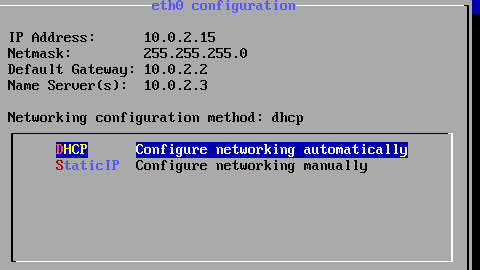
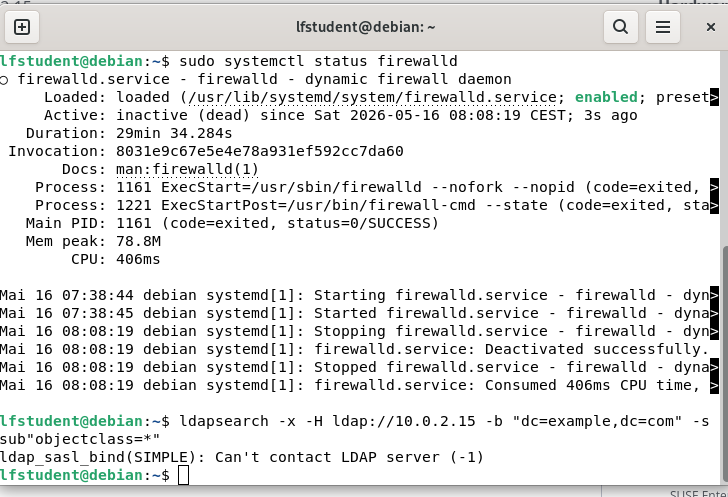
... as you can see still no connection.maybe you have a hint?
thanks for your patience and work
regards berni
0 -
Hi Luis,
i tried to connect via debian(baremetal host) and a Vm (ubuntu 24.04(LTS) , also Turnkey is on Boxen installed...
Boxen: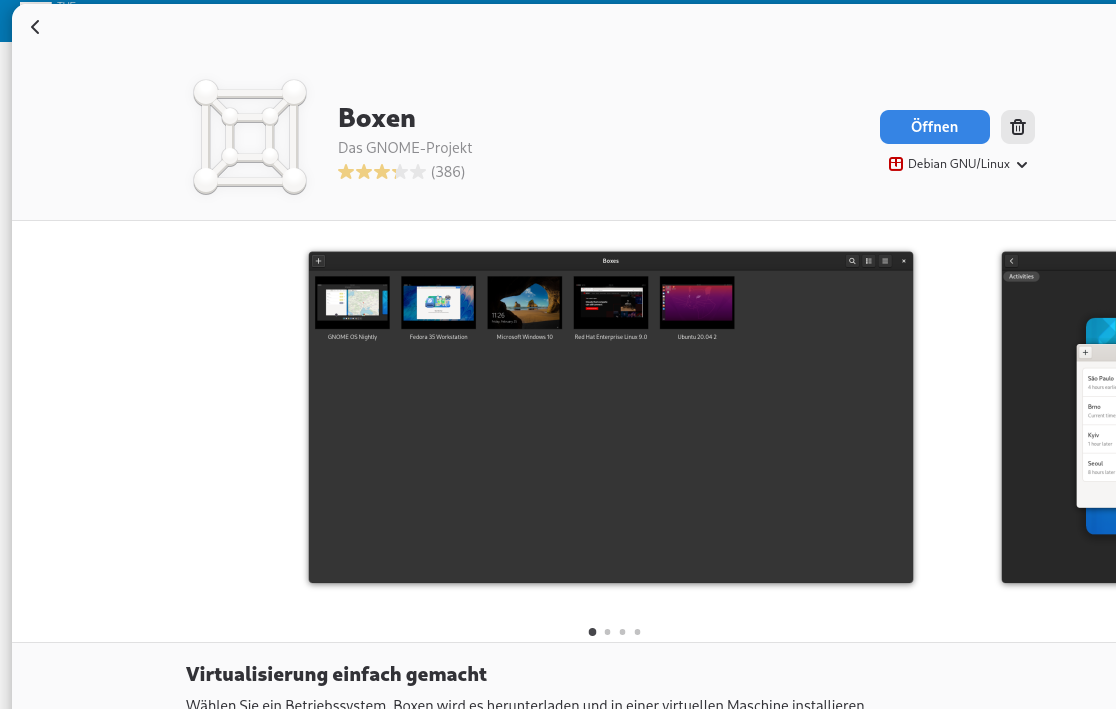 ... the GNU Project....
Thanks now i understand "Bridge-Mode"...on Virtual Box or VM Ware....i took Boxen cause it was easy to install on Debian 13, do you think i need Virtual Box and then it functions?
learned so much so far, some of the exercises are real hard nuts, thanks for your time and supporting me to progress.
regards berni
1 -
The course is meant to help you learn Linux sysadmin skills using the major distros and standard hypervisors. The skills you learn would then allow you to continue practicing on your own on setups of your choice.
While Luis is trying to be helpful, your inquiries are outside of the course scope. LF moderators are here to help with questions related to the course content.
Regards,
Flavia
Linux Foundation Education1 -
Hi Luis,
now that i have finished the course except of 2 or 3 unsolved exercises, i wanted to check my knowledge with the simulator for the exam, now as you can see it does not accept my swiss proton mail, and the github account, it want to force me to change the email-provider which i will not not....i know it has nothing to to with the exercises but maybe you can help because this is more than unconvenient and has no rightful base so whatever.
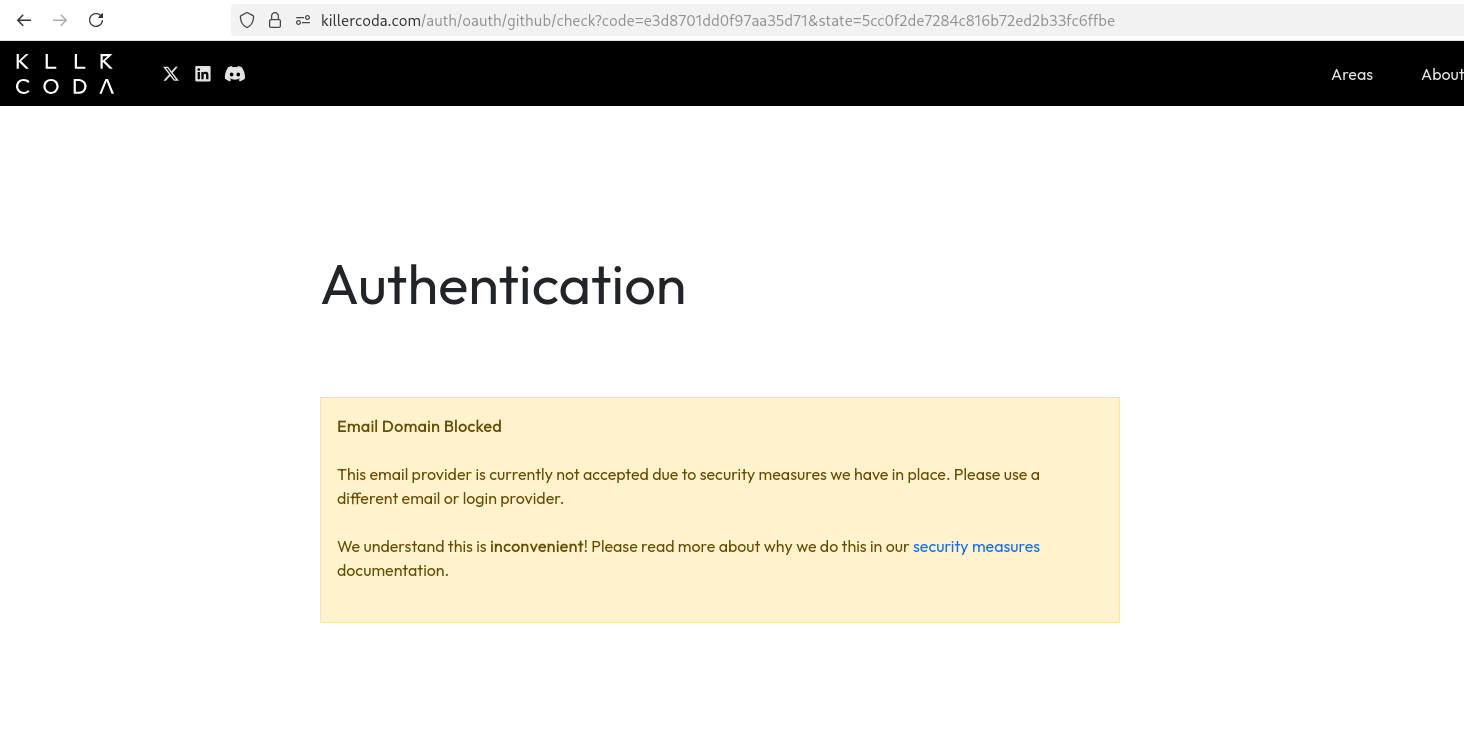
thanks
regards berni
0 -
The LFCS simulator you have access to as part of the LFCS exam purchase is offered by Killer.sh. Your screenshot indicates Killercoda. The simulator is not an LF product - please reach out directly to the provider for any assistance.
Regards,
Flavia
Linux Foundation Education0 -
Hi Berni,
1.- >Thanks now i understand "Bridge-Mode"...on Virtual Box or VM Ware....i took Boxen cause it was easy to install on Debian 13, do you think i need Virtual Box and then it functions?
I understood it, it's 'boxes', but 'boxen' in german, hehehe. So, I installed it and I tried to install a VM, but it was too slow. So, I don't think you need to change the hypervisor, just do the following:
i.- Configure both VMs in bridge mode (or nat, in the same network!): the client and also the LDAP Server, so they are in the same network and can reach each other.
ii.- Try again the same commands and let me know.
iii.- In case you can't find how to configure the network for the VMs, switch to Virtualbox and do the same, it will be very easy to do.
2.- >learned so much so far, some of the exercises are real hard nuts, thanks for your time and supporting me to progress.
It's being a pleasure!
Many regards,
Luis.0

Categories
- All Categories
- 179 LFX Mentorship
- 179 LFX Mentorship: Linux Kernel
- 776 Linux Foundation IT Professional Programs
- 384 Cloud Engineer IT Professional Program
- 175 Advanced Cloud Engineer IT Professional Program
- 76 DevOps IT Professional Program - Discontinued
- 7 DevOps & GitOps IT Professional Program
- 103 Cloud Native Developer IT Professional Program
- 7.7K Training Courses & Learning Paths
- 17 AI & ML Training
- 2 Blockchain & Decentralized Identity Training
- 44 Cloud & Containers Training
- 7 Cybersecurity Training
- 4 DevOps & Site-Reliability Training
- 3 Linux Kernel Development Training
- 2 Networking Training
- 2 Open Source Best Practice Training
- 6 System Administration Training
- 1 System Engineering Training
- 6 Web & Application Development Training
- 798 Hardware
- 202 Drivers
- 68 I/O Devices
- 37 Monitors
- 96 Multimedia
- 173 Networking
- 91 Printers & Scanners
- 92 Storage
- 774 Linux Distributions
- 82 Debian
- 68 Fedora
- 24 Linux Mint
- 13 Mageia
- 24 openSUSE
- 151 Red Hat Enterprise
- 32 Slackware
- 13 SUSE Enterprise
- 356 Ubuntu
- 473 Linux System Administration
- 31 Cloud Computing
- 73 Command Line/Scripting
- Github systems admin projects
- 104 Linux Security
- 79 Network Management
- 102 System Management
- 46 Web Management
- 174 Mobile Computing
- 32 Android
- 127 Development
- 1.2K New to Linux
- 1K Getting Started with Linux
- 407 Off Topic
- 128 Introductions
- 35 Study Material
- 1.1K Programming and Development
- 312 Kernel Development
- 729 Software Development
- 1K Software
- 421 Applications
- 183 Command Line
- 5 Compiling/Installing
- 71 Games
- 320 Installation
- Archived
- 183 Small Talk
- 2 LFD140 Class Forum
- 1.4K LFS258 Class Forum
Upcoming Training
-
August 20, 2018
Kubernetes Administration (LFS458)
-
August 20, 2018
Linux System Administration (LFS301)
-
August 27, 2018
Open Source Virtualization (LFS462)
-
August 27, 2018
Linux Kernel Debugging and Security (LFD440)