get the linux kernel failed, why?

hi Luis,
my next question is about chapter 13 git essentials/get the linux kernel...wanted to clone the kernel (on an Alma Linux 10)which was done, but when typed in "git log"...git log
the output was not like in the script but that there is no git-repository or parent directory...?....f
best regards
berni
Best Answer
-
Hi Berni,
1.- The first error says there is already a directory called 'linux' and it's not empty, so the files won't be downloaded. I think you already ran the git command before, or you created a directory called 'linux' with another content. So you need to check on that. In my case I have the following:
luis@debiansrv:~$ git clone --depth 1 -b master https://git.kernel.org/pub/scm/linux/kernel/git/stable/linux.git linux/
Cloning into 'linux'...
remote: Enumerating objects: 98494, done.
remote: Counting objects: 100% (98494/98494), done.
remote: Compressing objects: 100% (95816/95816), done.
remote: Total 98494 (delta 7697), reused 21011 (delta 1638), pack-reused 0 (from 0)
Receiving objects: 100% (98494/98494), 272.76 MiB | 1.97 MiB/s, done.
Resolving deltas: 100% (7697/7697), done.
Updating files: 100% (93024/93024), done.
luis@debiansrv:~$
luis@debiansrv:~$ git log
fatal: not a git repository (or any of the parent directories): .git
luis@debiansrv:~$
luis@debiansrv:~$ git init .
hint: Using 'master' as the name for the initial branch. This default branch name
hint: is subject to change. To configure the initial branch name to use in all
hint: of your new repositories, which will suppress this warning, call:
hint:
hint: git config --global init.defaultBranch
hint:
hint: Names commonly chosen instead of 'master' are 'main', 'trunk' and
hint: 'development'. The just-created branch can be renamed via this command:
hint:
hint: git branch -m
Initialized empty Git repository in /home/luis/.git/2.- The 'git log' command.
You need to get into the directory that has the code, and then run the 'git log' command, as follows:
luis@debiansrv:~$ cd linux/
luis@debiansrv:~/linux$
luis@debiansrv:~/linux$ git log
commit e774d5f1bc27a85f858bce7688509e866f8e8a4e (grafted, HEAD -> master, origin/master, origin/HEAD)
Author: Linus Torvalds torvalds@linux-foundation.org
Date: Fri Apr 10 17:27:08 2026 -0700Merge tag 'riscv-for-linus-v7.0-rc8' of git://git.kernel.org/pub/scm/linux/kernel/git/riscv/linux Pull RISC-V updates from Paul Walmsley: "Before v7.0 is released, fix a few issues with the CFI patchset, merged earlier in v7.0-rc, that primarily affect interfaces to non-kernel code: - Improve the prctl() interface for per-task indirect branch landing pad control to expand abbreviations and to resemble the speculation control prctl() interface - Expand the "LP" and "SS" abbreviations in the ptrace uapi header file to "branch landing pad" and "shadow stack", to improve readability - Fix a typo in a CFI-related macro name in the ptrace uapi header file - Ensure that the indirect branch tracking state and shadow stack state are unlocked immediately after an exec() on the new task so that libc subsequently can control it - While working in this area, clean up the kernel-internal, cross-architecture prctl() function names by expanding the abbreviations mentioned above" * tag 'riscv-for-linus-v7.0-rc8' of git://git.kernel.org/pub/scm/linux/kernel/git/riscv/linux: prctl: cfi: change the branch landing pad prctl()s to be more descriptive riscv: ptrace: cfi: expand "SS" references to "shadow stack" in uapi headers prctl: rename branch landing pad implementation functions to be more explicit riscv: ptrace: expand "LP" references to "branch landing pads" in uapi headers riscv: cfi: clear CFI lock status in start_thread() riscv: ptrace: cfi: fix "PRACE" typo in uapi headerSo please check on that and let me know.
Regards,
Luis.0

Answers
-
Hi Berni,
Please provide the exact steps you followed and the exact error you had, so I can see better what could be failing.
Regards,
Luis.0 -
Hi Luis,
attached you see what i tried and the outcome, again i thought about what you about the $PATH so i checked it and on the debian 12 machine it is: echo PATH = $PATH
PATH = /usr/local/bin:/usr/bin:/bin:/usr/local/games:/usr/games:/snap/bin
...on the Linux Alma 10 lfstudent1@localhost:~$ echo PATH=$PATH
PATH=/home/lfstudent1/.local/bin:/home/lfstudent1/bin:/usr/local/bin:/usr/local/sbin:/usr/bin:/usr/sbinso i guess i have to correct that, but my actual question you see in the screenshot....i am progressing but it is a great help to be able to ask someone when stuck....thanks best regards berni
0 -
Hi Berni,
I don't see any screenshots attached, so I can't see what the error is.
Regards,
Luis.0 -
Hi Luis,
here is the screenshot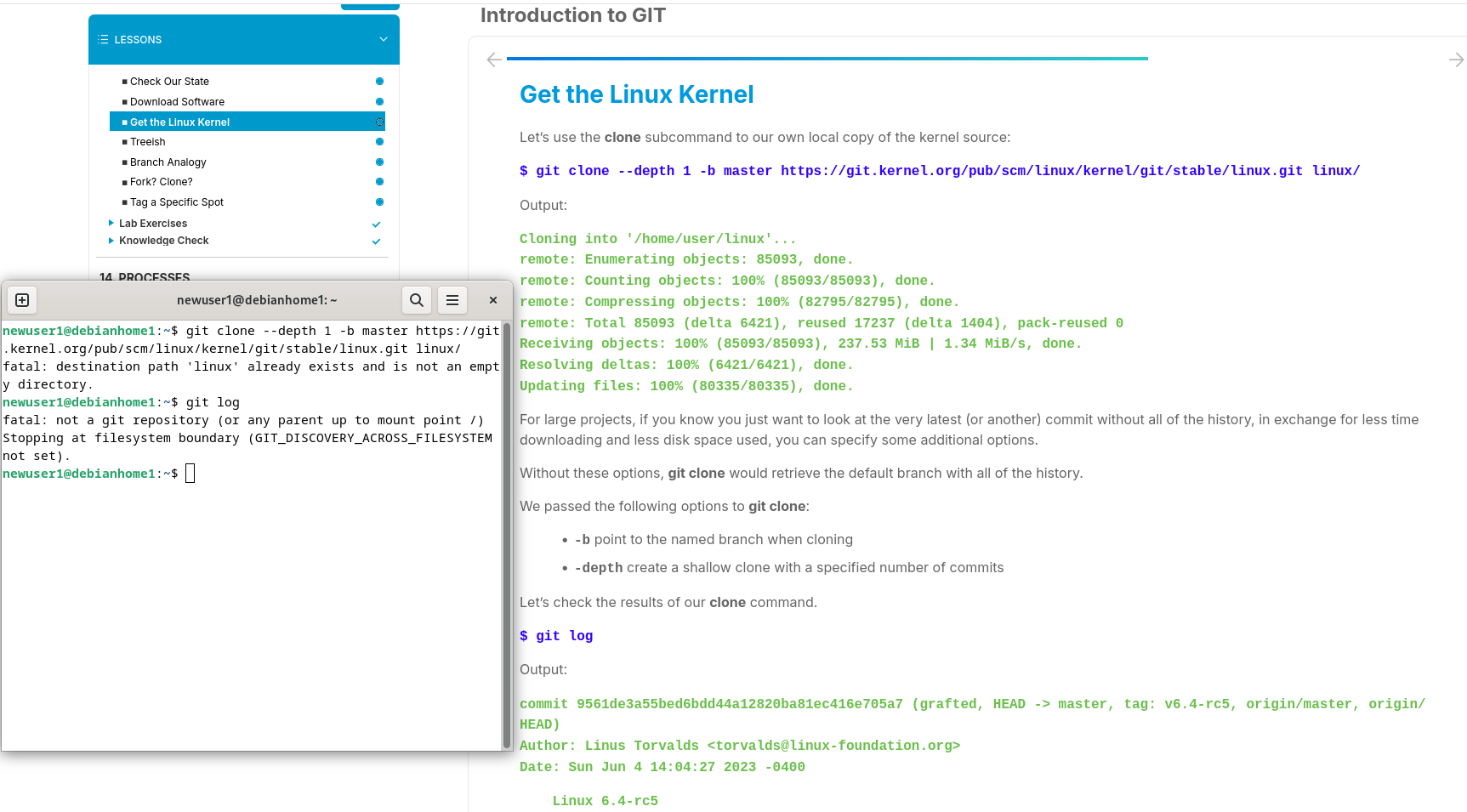
best regards
berni0 -
I don't think it is a path problem. I also no longer recommend getting a shallow clone, it is hard to update the repo without making it big away. most likely there is just confusion about what directory you are in. you also don't need to give a target directory, it Also can lead to confusion.
BTW, gracias Luis for doing such a great job! I do lurk on the forums 🤓
0 -
0
-
Hello Luis,
i did not cd into /linux that was the mistake, did not see that in the script...thanks for your time and work!
best regards
berni1 -
Hi Berni, I'm glad it worked for you! It's a pleasure

Best regards,
Luis.0

Categories
- All Categories
- 179 LFX Mentorship
- 179 LFX Mentorship: Linux Kernel
- 776 Linux Foundation IT Professional Programs
- 384 Cloud Engineer IT Professional Program
- 175 Advanced Cloud Engineer IT Professional Program
- 76 DevOps IT Professional Program - Discontinued
- 7 DevOps & GitOps IT Professional Program
- 103 Cloud Native Developer IT Professional Program
- 7.7K Training Courses & Learning Paths
- 17 AI & ML Training
- 2 Blockchain & Decentralized Identity Training
- 44 Cloud & Containers Training
- 7 Cybersecurity Training
- 4 DevOps & Site-Reliability Training
- 3 Linux Kernel Development Training
- 2 Networking Training
- 2 Open Source Best Practice Training
- 6 System Administration Training
- 1 System Engineering Training
- 6 Web & Application Development Training
- 798 Hardware
- 202 Drivers
- 68 I/O Devices
- 37 Monitors
- 96 Multimedia
- 173 Networking
- 91 Printers & Scanners
- 92 Storage
- 774 Linux Distributions
- 82 Debian
- 68 Fedora
- 24 Linux Mint
- 13 Mageia
- 24 openSUSE
- 151 Red Hat Enterprise
- 32 Slackware
- 13 SUSE Enterprise
- 356 Ubuntu
- 473 Linux System Administration
- 31 Cloud Computing
- 73 Command Line/Scripting
- Github systems admin projects
- 104 Linux Security
- 79 Network Management
- 102 System Management
- 46 Web Management
- 174 Mobile Computing
- 32 Android
- 127 Development
- 1.2K New to Linux
- 1K Getting Started with Linux
- 407 Off Topic
- 128 Introductions
- 35 Study Material
- 1.1K Programming and Development
- 312 Kernel Development
- 729 Software Development
- 1K Software
- 421 Applications
- 183 Command Line
- 5 Compiling/Installing
- 71 Games
- 320 Installation
- Archived
- 183 Small Talk
- 2 LFD140 Class Forum
- 1.4K LFS258 Class Forum
Upcoming Training
-
August 20, 2018
Kubernetes Administration (LFS458)
-
August 20, 2018
Linux System Administration (LFS301)
-
August 27, 2018
Open Source Virtualization (LFS462)
-
August 27, 2018
Linux Kernel Debugging and Security (LFD440)