Zypper package argument ambiguity?
I took the Knowledge Check for section 12 and got the question following question incorrect:
True or False? zypper update does not accept a package as argument.
I answered it does not accept a package as an argument. I got it wrong.
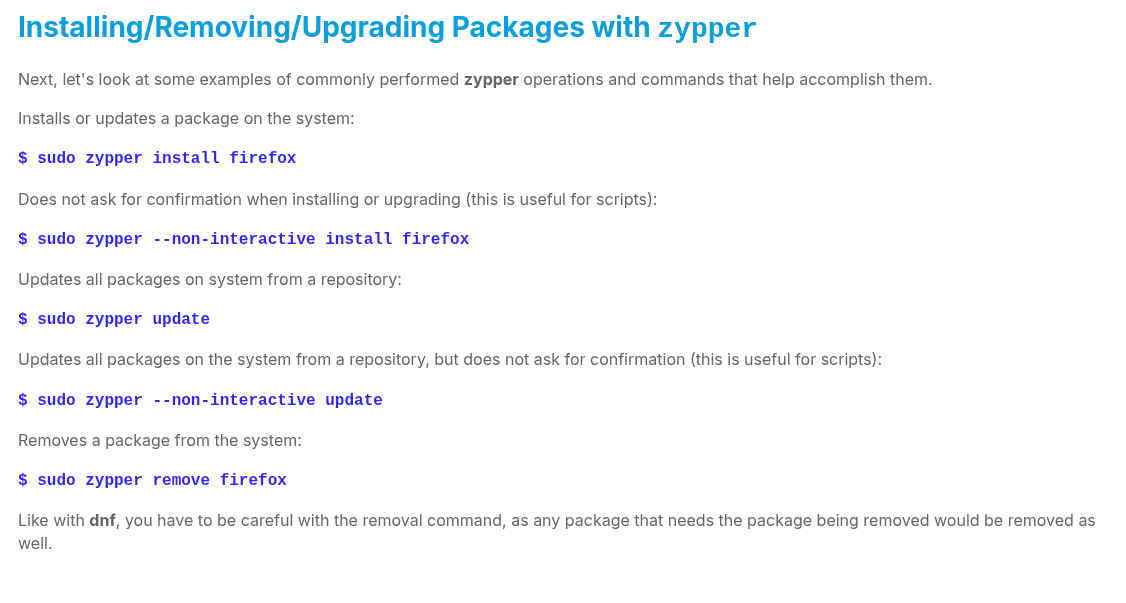
I checked my notes, went back to the course work, and found that there is no mention of an accepted argument for the update command:
Updates all packages on system from a repository:
$ sudo zypper update
I even checked the help section of zypper in OpenSUSE 15.5, and it makes no mention of an accepted argument either:
Update Management:
update, up Update installed packages with newer versions.
list-updates, lu List available updates.
patch Install needed patches.
list-patches, lp List available patches.
dist-upgrade, dup Perform a distribution upgrade.
patch-check, pchk Check for patches.
I assumed that since dnf [11] previously explicitely mentioned an optional arguement, that the lack of one given during this lesson meant that it does not accept a package as an argument.
Update a package from a repository (if no package is listed, update all packages):
$ sudo dnf update [package]
I ran the zypper command with the package argument, and it does indeed accept it.
I eventually found the issue... the lab that asks you to update a specific package.
The course teaches you to update a package using the install command, not update.
Installs or updates a package on the system:
$ sudo zypper install firefox
So I didn't catch that the answer in the lab is slightly different, because I successfully updated the package using install and didn't check the lab syntax to see that update was used instead.
Is there a specific reason the knowledge is relegated to a lab answer? It might be worth updating the verbiage on one or two of those command descriptions, as the lab answer seems to come out of nowhere.
Best Answer

Answers
-
Hi @peffse,
Yes, 'zypper update' can accept arguments. And there isn't any ambiguity about this. Look at the man page for zypper, from https://en.opensuse.org/Archive:Zypper_manual_(plain)
update (up) [options] [packagename]...
Update installed packages with newer versions, where possible. + This command will not update packages
which would require change of package vendor unless the vendor is specified in /etc/zypp/vendors.d, or
which would require manual resolution of problems with dependencies. Such non-installable updates will
then be listed in separate section of the summary as "The following package updates will NOT be
installed:". + To update individual packages, specify one or more package names. You can use the * and ?
wildcard characters in the package names to specify multiple packages matching the pattern.In fact I made a test on my openSUSE Leap 16.0 system:
So first I took a look at what packages are ready to update:
luis@opensuse:~> zypper list-updates
Cargando datos del repositorio...
Leyendo los paquetes instalados...
S | Repository | Name | Current Version | Available Version | Arch
---+----------------------+--------------------------------------+---------------------------------------+---------------------------------------+-------
v | repo-oss (16.0) | avahi | 0.8-160000.2.2 | 0.8-160000.4.1 | x86_64
v | repo-oss (16.0) | bind-utils | 9.20.11-160000.2.2 | 9.20.18-160000.1.1 | x86_64
v | repo-oss (16.0) | branding-openSUSE | 16.0.20240405-lp160.9.1 | 16.0.20240405-lp160.10.1 | x86_64
v | repo-oss (16.0) | colord | 1.4.6-160000.2.2 | 1.4.8-160000.1.1 | x86_64
v | repo-oss (16.0) | colord-color-profiles | 1.4.6-160000.2.2 | 1.4.8-160000.1.1 | x86_64
v | repo-oss (16.0) | curl | 8.14.1-160000.2.2 | 8.14.1-160000.4.1 | x86_64Then I choose 'curl' to update it:
luis@opensuse:~> sudo zypper update curl
[sudo] contraseña para luis:
Actualizando el servicio 'openSUSE'.
Cargando datos del repositorio...
Leyendo los paquetes instalados...
Resolviendo dependencias de paquete...El siguiente paquete va a ser actualizado:
curl1 paquete a actualizar.
Tamaño de la descarga del paquete: 585,1 KiB
Cambio de tamaño de la instalación del paquete:
| 558,1 KiB requerido por los paquetes que se instalarán
603 B | - 557,5 KiB liberados por los paquetes que van a ser eliminadosBackend: classic_rpmtrans
¿Desea continuar? [s/n/v/...? mostrar todas las opciones] (s): s
Precargando: curl-8.14.1-160000.4.1.x86_64.rpm [terminado]
Precarga finalizada. [correcto (200,0 KiB/s) ] ........................................................................................................................[terminado]
Obteniendo: curl-8.14.1-160000.4.1.x86_64 (repo-oss (16.0)) (1/1), 585,1 KiBBuscando conflictos de archivos: ......................................................................................................................................[terminado]
(1/1) Instalando: curl-8.14.1-160000.4.1.x86_64 .......................................................................................................................[terminado]
Ejecutando guiones postransacción .....................................................................................................................................[terminado]luis@opensuse:~>
I hope this helps

Regards,
Luis.0 -
Oh, I think there might have been a misunderstanding. I was asking why the lesson does not actually include this information.
 0
0

Categories
- All Categories
- 179 LFX Mentorship
- 179 LFX Mentorship: Linux Kernel
- 776 Linux Foundation IT Professional Programs
- 384 Cloud Engineer IT Professional Program
- 175 Advanced Cloud Engineer IT Professional Program
- 76 DevOps IT Professional Program - Discontinued
- 7 DevOps & GitOps IT Professional Program
- 103 Cloud Native Developer IT Professional Program
- 7.7K Training Courses & Learning Paths
- 17 AI & ML Training
- 2 Blockchain & Decentralized Identity Training
- 44 Cloud & Containers Training
- 7 Cybersecurity Training
- 4 DevOps & Site-Reliability Training
- 3 Linux Kernel Development Training
- 2 Networking Training
- 2 Open Source Best Practice Training
- 6 System Administration Training
- 1 System Engineering Training
- 6 Web & Application Development Training
- 798 Hardware
- 202 Drivers
- 68 I/O Devices
- 37 Monitors
- 96 Multimedia
- 173 Networking
- 91 Printers & Scanners
- 92 Storage
- 774 Linux Distributions
- 82 Debian
- 68 Fedora
- 24 Linux Mint
- 13 Mageia
- 24 openSUSE
- 151 Red Hat Enterprise
- 32 Slackware
- 13 SUSE Enterprise
- 356 Ubuntu
- 473 Linux System Administration
- 31 Cloud Computing
- 73 Command Line/Scripting
- Github systems admin projects
- 104 Linux Security
- 79 Network Management
- 102 System Management
- 46 Web Management
- 174 Mobile Computing
- 32 Android
- 127 Development
- 1.2K New to Linux
- 1K Getting Started with Linux
- 407 Off Topic
- 128 Introductions
- 35 Study Material
- 1.1K Programming and Development
- 312 Kernel Development
- 729 Software Development
- 1K Software
- 421 Applications
- 183 Command Line
- 5 Compiling/Installing
- 71 Games
- 320 Installation
- Archived
- 183 Small Talk
- 2 LFD140 Class Forum
- 1.4K LFS258 Class Forum
Upcoming Training
-
August 20, 2018
Kubernetes Administration (LFS458)
-
August 20, 2018
Linux System Administration (LFS301)
-
August 27, 2018
Open Source Virtualization (LFS462)
-
August 27, 2018
Linux Kernel Debugging and Security (LFD440)