fatal errors with installing

i really do not know where else to ask...
after finishing the LF101 Course i made half of the introduction to kubernetes, now i switched to this course and well...i have installed minkube v1.34.2 and now i have fatal errors ..see picture....a teamviewer session would be a great help...but well....i guess i have to do it all again...maybe with a another machine...sorry this is disturbing..trying to get forward...well last but not least..these pdf are really more hard to copy than in the introduction course to kubernetes....have a good day kubernetes admins
regards bernhard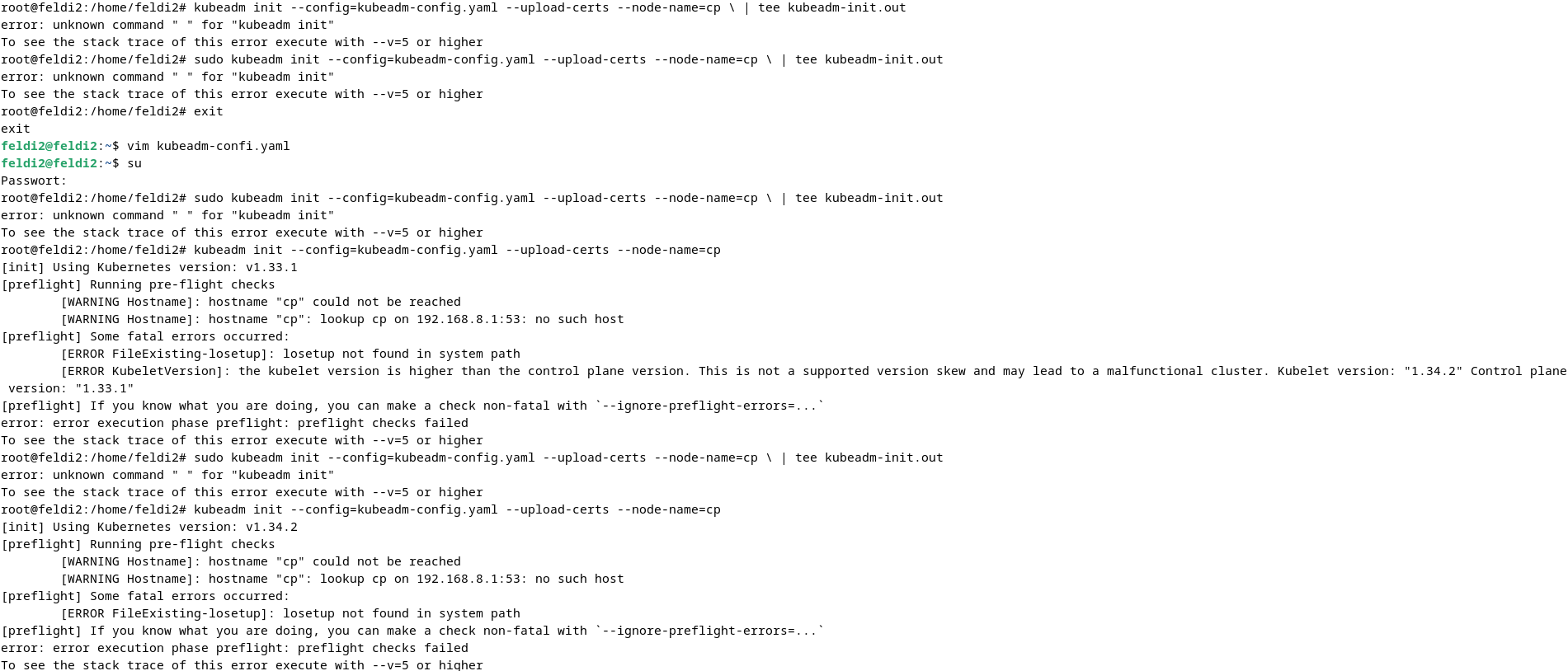
Best Answers
-
Hi @austrianadmin,
As you may have observed by now, each training course has its own strict environment requirements, and with that very distinct installation and configuration activities.
Mixing environments between courses is adversely impacting your progress. LFS258 assumes a clean setup on two clean VMs (cloud or local) - this avoids any conflicts with Minikube Kubernetes and other tools you may have installed. And, if the VMs get damaged beyond repair, they can be re-provisioned, allowing for a fresh new install of Kubernetes and its dependencies.
An observation from the output attached above: running
kubeadm initseveral times in sequence will not help your case, it will only produce the same errors over and over. Akubeadm resetis recommended after a failedinitto clean the environment. Also, ensure you follow the strict versioning schema from the LFS258 installation section, to avoid any conflicts and/or compatibility issues.Regards,
-Chris0 -
Hi @austrianadmin,
Per the Overview section in Lab exercise 3.1: Install Kubernetes, the recommended guest OS for the virtual environment is Ubuntu 24.04 LTS. This OS can be installed on two Virtual Machines, either cloud instances (AWS, Azure, Digital Ocean, Google Cloud, IBM Cloud, etc.) or local VMs (VirtualBox, KVM, Hyper-V, or other hypervisors that are supported by your host system).
If you prefer to deviate from the recommended setup and use a different guest OS on your Virtual Machines, then you need to find the software packages, gpg keys, and package manager source lists that are specific to the OS of your choice.
Keep in mind, however, that the lab exercises have been tested on Ubuntu 24.04 LTS, but not on other distributions.
While the host system OS can be Windows, MacOS, or a Linux distribution (Debian, etc.), the Virtual Machines hosting your lab environment would need to be running Ubuntu 24.04 LTS.
Regards,
-Chris0

Answers
-
Hi Chris,
thanks to your advise i deleteted the minikube, and started again writing the commands carefully, this was fine until....12. Install the containerd software.
root@cp: ̃# apt-get update && apt-get install containerd.io -y.....root@feldi2:/home/feldi2# sudo apt-get install containerd.io
E: malform entry 1 in list Datei /etc/apt/sources.list.d/docker.list (URI parse)
E: Die Liste der Quellen konnte nicht gelesen werden.(the list of the sources can not be read)
tried with cat....
root@feldi2:/home/feldi2# cat /etc/apt/sources.list.d/docker.list
deb [arch=amd64 signed-by=/etc/apt/keyrings/docker.gpg] \ https://download.docker.com/linux/ubuntu \ bookworm stable.....so my question is it because i have debian and not ubuntu?....otherwise i have no idea how to fix this.....after finishing the 101 course,i should have first done the linux sysadmin course and then the kubernetes admin, sorry for my questions...regards bernhard
0
Categories
- All Categories
- 164 LFX Mentorship
- 164 LFX Mentorship: Linux Kernel
- 724 Linux Foundation IT Professional Programs
- 368 Cloud Engineer IT Professional Program
- 161 Advanced Cloud Engineer IT Professional Program
- 69 DevOps IT Professional Program - Discontinued
- 1 DevOps & GitOps IT Professional Program
- 94 Cloud Native Developer IT Professional Program
- 33 Express Training Courses & Microlearning
- 31 Express Courses - Discussion Forum
- 2 Microlearning - Discussion Forum
- 7.4K Training Courses
- 25 LFC110 Class Forum - Discontinued
- 15 LFC131 Class Forum - DISCONTINUED
- 54 LFD102 Class Forum
- 254 LFD103 Class Forum
- 1 LFD103-JP クラス フォーラム
- 17 LFD110 Class Forum
- LFD114 Class Forum
- 54 LFD121 Class Forum
- 3 LFD123 Class Forum
- 2 LFD125 Class Forum
- 3 LFD133 Class Forum
- 4 LFD134 Class Forum
- 4 LFD137 Class Forum
- 1 LFD140 Class Forum
- 66 LFD201 Class Forum
- 7 LFD210 Class Forum
- 3 LFD210-CN Class Forum
- 1 LFD213 Class Forum - Discontinued
- 1 LFD221 Class Forum
- 127 LFD232 Class Forum - Discontinued
- 2 LFD233 Class Forum - Discontinued
- 4 LFD237 Class Forum
- 24 LFD254 Class Forum
- 759 LFD259 Class Forum
- 110 LFD272 Class Forum - Discontinued
- 2 LFD272-JP クラス フォーラム - Discontinued
- 22 LFD273 Class Forum
- 657 LFS101 Class Forum
- 4 LFS111 Class Forum - Discontinued
- 2 LFS112 Class Forum
- LFS114 Class Forum
- 4 LFS116 Class Forum
- 6 LFS118 Class Forum
- 2 LFS120 Class Forum
- 1 LFS140 Class Forum
- 11 LFS142 Class Forum
- 9 LFS144 Class Forum
- 5 LFS145 Class Forum
- 6 LFS146 Class Forum
- 7 LFS147 Class Forum
- 26 LFS148 Class Forum
- 22 LFS151 Class Forum - Discontinued
- 4 LFS157 Class Forum
- 167 LFS158 Class Forum
- 1 LFS158-JP クラス フォーラム
- 17 LFS162 Class Forum
- 1 LFS166 Class Forum - Discontinued
- 8 LFS167 Class Forum
- 4 LFS170 Class Forum
- 1 LFS171 Class Forum - Discontinued
- 3 LFS178 Class Forum - Discontinued
- 3 LFS180 Class Forum
- 2 LFS182 Class Forum
- 6 LFS183 Class Forum
- 2 LFS184 Class Forum
- 42 LFS200 Class Forum
- 736 LFS201 Class Forum - Discontinued
- 2 LFS201-JP クラス フォーラム - Discontinued
- 23 LFS203 Class Forum
- 151 LFS207 Class Forum
- 2 LFS207-DE-Klassenforum
- 3 LFS207-JP クラス フォーラム
- 301 LFS211 Class Forum - Discontinued
- 55 LFS216 Class Forum - Discontinued
- 60 LFS241 Class Forum
- 51 LFS242 Class Forum
- 41 LFS243 Class Forum
- 18 LFS244 Class Forum
- 8 LFS245 Class Forum
- 1 LFS246 Class Forum
- 1 LFS248 Class Forum
- 164 LFS250 Class Forum
- 3 LFS250-JP クラス フォーラム
- 2 LFS251 Class Forum - Discontinued
- 164 LFS253 Class Forum
- 1 LFS254 Class Forum - Discontinued
- 3 LFS255 Class Forum
- 18 LFS256 Class Forum
- 2 LFS257 Class Forum
- 1.4K LFS258 Class Forum
- 12 LFS258-JP クラス フォーラム
- 149 LFS260 Class Forum
- 164 LFS261 Class Forum
- 45 LFS262 Class Forum
- 82 LFS263 Class Forum - Discontinued
- 15 LFS264 Class Forum - Discontinued
- 11 LFS266 Class Forum - Discontinued
- 25 LFS267 Class Forum
- 27 LFS268 Class Forum
- 38 LFS269 Class Forum
- 10 LFS270 Class Forum
- 202 LFS272 Class Forum - Discontinued
- 2 LFS272-JP クラス フォーラム - Discontinued
- 1 LFS274 Class Forum - Discontinued
- 4 LFS281 Class Forum - Discontinued
- 32 LFW111 Class Forum
- 265 LFW211 Class Forum - Discontinued
- 190 LFW212 Class Forum - Discontinued
- 18 SKF100 Class Forum
- 2 SKF200 Class Forum
- 3 SKF201 Class Forum
- 789 Hardware
- 202 Drivers
- 68 I/O Devices
- 37 Monitors
- 95 Multimedia
- 173 Networking
- 89 Printers & Scanners
- 86 Storage
- 764 Linux Distributions
- 81 Debian
- 67 Fedora
- 20 Linux Mint
- 13 Mageia
- 23 openSUSE
- 150 Red Hat Enterprise
- 31 Slackware
- 13 SUSE Enterprise
- 355 Ubuntu
- 459 Linux System Administration
- 31 Cloud Computing
- 72 Command Line/Scripting
- Github systems admin projects
- 94 Linux Security
- 78 Network Management
- 100 System Management
- 46 Web Management
- 67 Mobile Computing
- 18 Android
- 38 Development
- 1.2K New to Linux
- 1K Getting Started with Linux
- 381 Off Topic
- 117 Introductions
- 174 Small Talk
- 29 Study Material
- 731 Programming and Development
- 309 Kernel Development
- 404 Software Development
- 893 Software
- 286 Applications
- 182 Command Line
- 5 Compiling/Installing
- 68 Games
- 316 Installation
- 62 All In Program
- 62 All In Forum
Upcoming Training
-
August 20, 2018
Kubernetes Administration (LFS458)
-
August 20, 2018
Linux System Administration (LFS301)
-
August 27, 2018
Open Source Virtualization (LFS462)
-
August 27, 2018
Linux Kernel Debugging and Security (LFD440)