Lab 8.1 - Helm/Apache Pending external IP assignment.

I am experiencing an issue with Helm/Apache chart
helm install anotherweb .
NAME: anotherweb
LAST DEPLOYED: Tue Oct  7 11:26:09 2025
NAMESPACE: default
STATUS: deployed
REVISION: 1
TEST SUITE: None
NOTES:
CHART NAME: apache
CHART VERSION: 11.4.29
APP VERSION: 2.4.65

⚠ WARNING: Since August 28th, 2025, only a limited subset of images/charts are available for free.
    Subscribe to Bitnami Secure Images to receive continued support and security updates.
    More info at https://bitnami.com and https://github.com/bitnami/containers/issues/83267

** Please be patient while the chart is being deployed **

1. Get the Apache URL by running:

** Please ensure an external IP is associated to the anotherweb-apache service before proceeding **
** Watch the status using: kubectl get svc --namespace default -w anotherweb-apache **

  export SERVICE_IP=$(kubectl get svc --namespace default anotherweb-apache --template "{{ range (index .status.loadBalancer.ingress 0) }}{{ . }}{{ end }}")
  echo URL            : http://$SERVICE_IP/


WARNING: You did not provide a custom web application. Apache will be deployed with a default page. Check the README section "Deploying your custom web application" in https://github.com/bitnami/charts/blob/main/bitnami/apache/README.md#deploying-a-custom-web-application.

WARNING: There are "resources" sections in the chart not set. Using "resourcesPreset" is not recommended for production. For production installations, please set the following values according to your workload needs:
  - resources
+info https://kubernetes.io/docs/concepts/configuration/manage-resources-containers/
It doesn't want to assign the external IP
kubectl get svc --namespace default -w anotherweb-apache
NAME                TYPE           CLUSTER-IP     EXTERNAL-IP   PORT(S)                      AGE
anotherweb-apache   LoadBalancer   10.109.39.75   <pending>     80:31450/TCP,443:31639/TCP   102s
The logs are saying it cannot pull the image
kubectl logs anotherweb-apache-687bd9c775-rl9qv --all-containers
Error from server (BadRequest): container "preserve-logs-symlinks" in pod "anotherweb-apache-687bd9c775-rl9qv" is waiting to start: trying and failing to pull image


kubectl describe pod anotherweb-apache-687bd9c775-rl9qv

[...]
Events:
  Type     Reason     Age                  From               Message
  ----     ------     ----                 ----               -------
  Normal   Scheduled  2m26s                default-scheduler  Successfully assigned default/anotherweb-apache-687bd9c775-rl9qv to worker
  Normal   Pulling    59s (x4 over 2m26s)  kubelet            Pulling image "docker.io/bitnami/apache:2.4.65-debian-12-r2"
  Warning  Failed     59s (x4 over 2m25s)  kubelet            Failed to pull image "docker.io/bitnami/apache:2.4.65-debian-12-r2": rpc error: code = NotFound desc = failed to pull and unpack image "docker.io/bitnami/apache:2.4.65-debian-12-r2": failed to resolve reference "docker.io/bitnami/apache:2.4.65-debian-12-r2": docker.io/bitnami/apache:2.4.65-debian-12-r2: not found
  Warning  Failed     59s (x4 over 2m25s)  kubelet            Error: ErrImagePull
  Normal   BackOff    4s (x9 over 2m24s)   kubelet            Back-off pulling image "docker.io/bitnami/apache:2.4.65-debian-12-r2"
  Warning  Failed     4s (x9 over 2m24s)   kubelet            Error: ImagePullBackOff
I tried the tag "latest" but it didn't help
Events:
  Type     Reason     Age                From               Message
  ----     ------     ----               ----               -------
  Normal   Scheduled  36s                default-scheduler  Successfully assigned default/anotherweb-apache-b455d98bf-mv7t2 to worker
  Normal   Pulling    22s (x2 over 35s)  kubelet            Pulling image "docker.io/bitnami/apache:latest"
  Warning  Failed     22s (x2 over 34s)  kubelet            Failed to pull image "docker.io/bitnami/apache:latest": rpc error: code = NotFound desc = failed to pull and unpack image "docker.io/bitnami/apache:latest": failed to resolve reference "docker.io/bitnami/apache:latest": docker.io/bitnami/apache:latest: not found
  Warning  Failed     22s (x2 over 34s)  kubelet            Error: ErrImagePull
  Normal   BackOff    7s (x2 over 33s)   kubelet            Back-off pulling image "docker.io/bitnami/apache:latest"
  Warning  Failed     7s (x2 over 33s)   kubelet            Error: ImagePullBackOff
It only works when allowing insecure image:
helm install anotherweb bitnami/apache \
  --set image.repository=bitnamilegacy/apache \
  --set image.tag=2.4.65-debian-12-r2 \
  --set global.security.allowInsecureImages=true
After a while the pod is running, but it doesn't want to assign the external IP.
ubuntu@k8scp:~/apache$ kubectl get svc --namespace default -w anotherweb-apache
NAME                TYPE           CLUSTER-IP    EXTERNAL-IP   PORT(S)                      AGE
anotherweb-apache   LoadBalancer   10.99.22.42   <pending>     80:31316/TCP,443:31813/TCP   5m46s
^Cubuntu@k8scp:~/apache$ kubectl get svc --namespace default -w anotherweb-apache
NAME                TYPE           CLUSTER-IP    EXTERNAL-IP   PORT(S)                      AGE
anotherweb-apache   LoadBalancer   10.99.22.42   <pending>     80:31316/TCP,443:31813/TCP   10m
ubuntu@k8scp:~/apache$ ^C
ubuntu@k8scp:~/apache$ kubectl get svc --namespace default -w anotherweb-apache
NAME                TYPE           CLUSTER-IP    EXTERNAL-IP   PORT(S)                      AGE
anotherweb-apache   LoadBalancer   10.99.22.42   <pending>     80:31316/TCP,443:31813/TCP   21m
^Cubuntu@k8scp:~/apache$ kubectl get svc --namespace default -w anotherweb-apache
NAME                TYPE           CLUSTER-IP    EXTERNAL-IP   PORT(S)                      AGE
anotherweb-apache   LoadBalancer   10.99.22.42   <pending>     80:31316/TCP,443:31813/TCP   34m
So I can't get the service ip:
export SERVICE_IP=$(kubectl get svc --namespace default anotherweb-apache --template "{{ range (index .status.loadBalancer.ingress 0) }}{{ . }}{{ end }}")
error: error executing template "{{ range (index .status.loadBalancer.ingress 0) }}{{ . }}{{ end }}": template: output:1:10: executing "output" at <index .status.loadBalancer.ingress 0>: error calling index: index of untyped nil

echo URL            : http://$SERVICE_IP/
URL : http://Error executing template: template: output:1:10: executing "output" at <index .status.loadBalancer.ingress 0>: error calling index: index of untyped nil.
I've waited for over an hour and still nothing.
I'm on AWS EC2 and followed setup with Cillium. Happy to post command outputs if necessary
Comments
-
Thank you for identifying the additional flags needed to deploy the bitnami/apache chart. I shall forward your findings to our course maintainer.
The class lab environment setup is not configured for external IP assignment in the case of LoadBalancer service type, so the pending state is normal. To access the webserver app, you have different options:
- Logged into either node, you can use
curlfrom a terminal, targeting the cluster IP (10.99.22.42) of the service exposing the anotherweb application, and port 80. It would be something like$ curl 10.99.22.42:80 - From your workstation, you can use
curlfrom a terminal, targeting the public IP of either cloud VM (it should work with cp and with worker public IP addresses), and node port 31316 (according to your output above). It would be something like$ curl 35.45.55.65:31316(where your public IP will be different). - From your workstation, from a browser, send an http:// request to the public IP of either cloud VM (it should work with cp and with worker public IP addresses), and port node 31316 (according to your output above). Assuming the same dummy public IP from above
http://35.45.55.65:31316.
Regards,
-Chris0 - Logged into either node, you can use
-
Hello there,
I am facing the same problem but I'm not sure the pending IP is a real problem in this lab situation as all we want right now is being able to read "It works!" from our apache besides the fact that the template NOTES.txt invite us to query it from external IP.
But keeping "bitnami" repository name in values is a real problem as they left docker hub in August 28th.
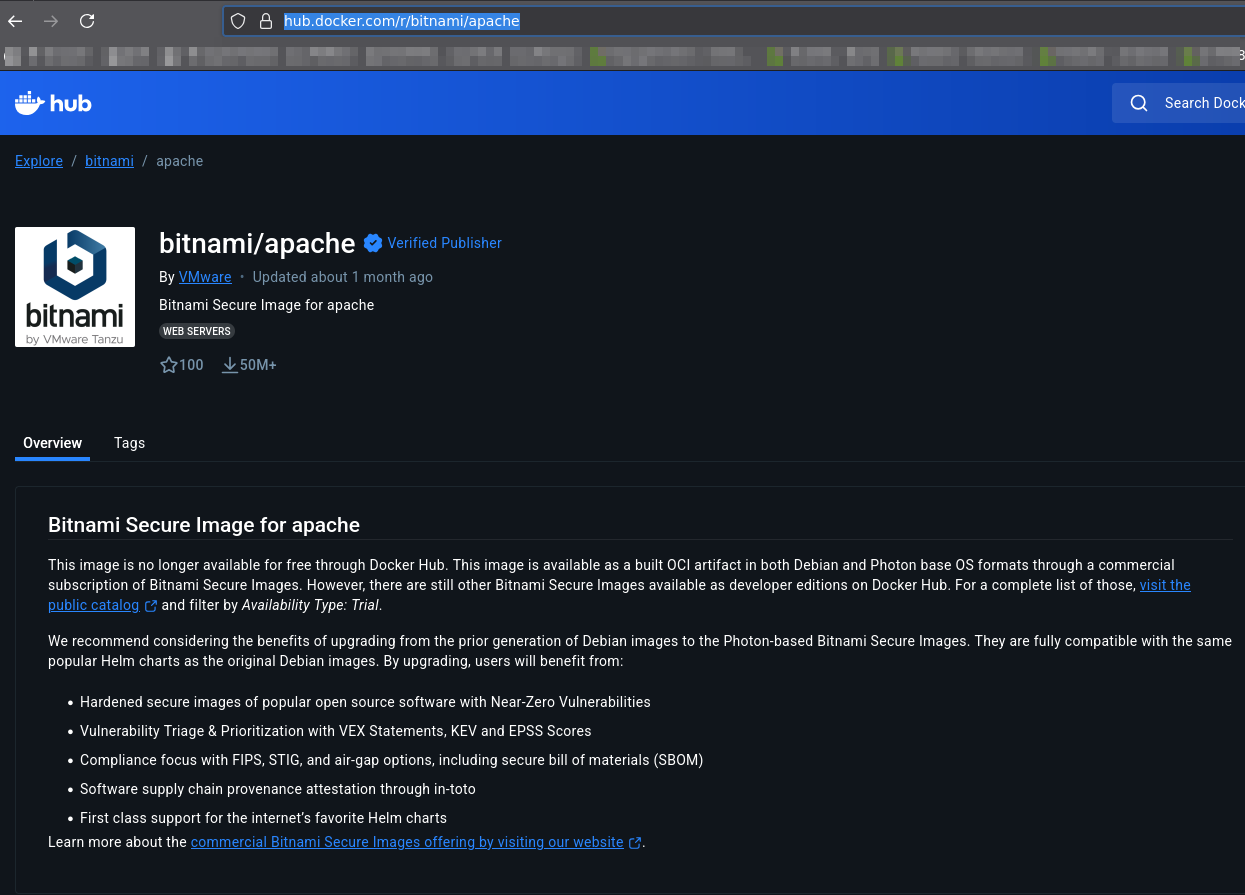
So replacing repository: bitnami/... by bitnamilegacy/... in values.yaml permitted to pull images (got to replace it 3 times in values with vi a sed command should be better) and voila :
student@cp:~/apache$ vi values.yaml
student@cp:~/apache$ helm install anotherweb .
NAME: anotherweb
LAST DEPLOYED: Fri Oct 10 23:20:40 2025
NAMESPACE: default
STATUS: deployed
REVISION: 1
TEST SUITE: None

[...]

Substituted images detected:
  - docker.io/bitnamilegacy/apache:2.4.65-debian-12-r2
  - docker.io/bitnamilegacy/git:2.51.0-debian-12-r0
  - docker.io/bitnamilegacy/apache-exporter:1.0.10-debian-12-r55

⚠ WARNING: Original containers have been substituted for unrecognized ones. Deploying this chart with non-standard containers is likely to cause degraded security and performance, broken chart features, and missing environment variables.

Unrecognized images:
  - docker.io/bitnamilegacy/apache:2.4.65-debian-12-r2
  - docker.io/bitnamilegacy/apache-exporter:1.0.10-debian-12-r55
student@cp:~/apache$ kubectl get svc
NAME                TYPE           CLUSTER-IP     EXTERNAL-IP   PORT(S)                      AGE
anotherweb-apache   LoadBalancer   10.103.94.17   <pending>     80:32186/TCP,443:32053/TCP   35s
kubernetes          ClusterIP      10.96.0.1      <none>        443/TCP                      10d
student@cp:~/apache$ curl 10.103.94.17
<html><body><h1>It works!</h1></body></html>
Although I got it to answer, maybe it could induce errors or problems... idk.
0


Categories
- All Categories
- 177 LFX Mentorship
- 177 LFX Mentorship: Linux Kernel
- 769 Linux Foundation IT Professional Programs
- 379 Cloud Engineer IT Professional Program
- 175 Advanced Cloud Engineer IT Professional Program
- 75 DevOps IT Professional Program - Discontinued
- 7 DevOps & GitOps IT Professional Program
- 102 Cloud Native Developer IT Professional Program
- 7.6K Training Courses & Learning Paths
- 7 AI & ML Training
- 1 Blockchain & Decentralized Identity Training
- 16 Cloud & Containers Training
- 2 Cybersecurity Training
- 2 DevOps & Site-Reliability Training
- 1 Linux Kernel Development Training
- 2 Networking Training
- 2 Open Source Best Practice Training
- 4 System Administration Training
- 1 System Engineering Training
- 2 Web & Application Development Training
- 796 Hardware
- 202 Drivers
- 68 I/O Devices
- 37 Monitors
- 95 Multimedia
- 173 Networking
- 91 Printers & Scanners
- 91 Storage
- 771 Linux Distributions
- 81 Debian
- 68 Fedora
- 23 Linux Mint
- 13 Mageia
- 24 openSUSE
- 151 Red Hat Enterprise
- 31 Slackware
- 13 SUSE Enterprise
- 356 Ubuntu
- 466 Linux System Administration
- 31 Cloud Computing
- 73 Command Line/Scripting
- Github systems admin projects
- 98 Linux Security
- 79 Network Management
- 101 System Management
- 46 Web Management
- 127 Mobile Computing
- 20 Android
- 92 Development
- 1.2K New to Linux
- 1K Getting Started with Linux
- 400 Off Topic
- 124 Introductions
- 32 Study Material
- 1K Programming and Development
- 310 Kernel Development
- 705 Software Development
- 1K Software
- 409 Applications
- 182 Command Line
- 5 Compiling/Installing
- 70 Games
- 318 Installation
- Archived
- 183 Small Talk
- 2 LFD140 Class Forum
- 1.4K LFS258 Class Forum
Upcoming Training
-
August 20, 2018
Kubernetes Administration (LFS458)
-
August 20, 2018
Linux System Administration (LFS301)
-
August 27, 2018
Open Source Virtualization (LFS462)
-
August 27, 2018
Linux Kernel Debugging and Security (LFD440)