Jenkins fails to spawn docker agents

Hi,
I am facing a problem with the Lab Guide. I am in the Lab 4.1
I do not have a Vagrant compatible machine so I am trying to create the environment myself.
I have spun up a Ubuntu VM and have installed the Docker Host on it. exposed the Docker host on tcp://0.0.0.0:2376 on the Docker host and it responds by showing the versions in JSON on the terminal when I try to curl the docker host. I pulled the jenkins image and started it using the following command:
docker run -itd —rm -v vol_jenkins:/var/jenkins_home —name jenkins-lts -p 8080:8080 -p 50000:50000 jenkins/jenkins:lts
It runs fine.
I have installed the docker-plugin in Jenkins and have configured the Cloud. I can see the versions information displayed on the Jenkins Test Connection page.

I tried to create a Freestvle Proiect in Jenkins and selected the
"Restrict where this project can be run" and supplied the docker label here.
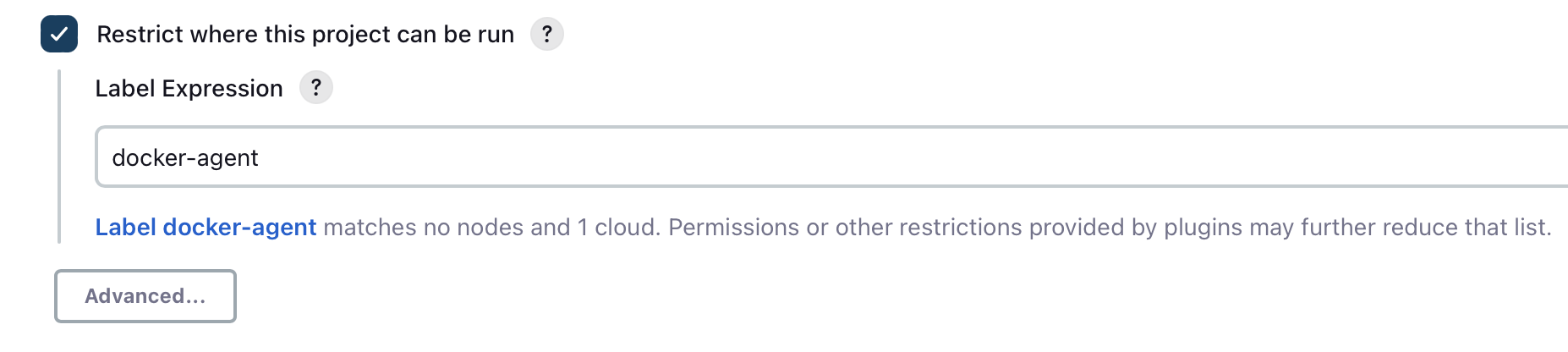
And finally, in the Build Steps I have the following, to keep everything nice and simple.

When I start the build, Jenkins cannot spawn the Docker container, I am guessing, because it always gets stuck here

I logged onto the VM and tried to curl the VM IP address with the docker host port number and I do get the json response back with the docker version and all.
I disabled the ufw firewall by running the sudo ufw disable on the VM.
I am using the jenkins/ssh-slave as my docker image in the Docker Agent Template.


Would you help me by telling me where to start the troubleshooting? Or what am I missing here please. Thank you.
Comments
-
I finally figured out the issue. It’s sadly because of the outdated course content.
There are a couple of updates.
First update is -
Jenkins has stopped supporting the
jenkins/ssh-slaveimage as documented here - https://hub.docker.com/r/jenkins/ssh-agent . The newer image isjenkins/ssh-agentFigured this out the hard way. I would like to document the process we all might follow to figure out any issues with Jenkins or its agents. Jenkins throws all its logging data to system logs, which can be viewed with the
journalctl -xefcommand. This can be customised though, but this is the default behaviour on an Ubuntu GNU/Linux system.Second update is -
Docker does not have any
docker_defaultnetwork as mentioned in the guide. I had to create a bridge network on my system by running the commanddocker network create --driver bridge jenkins_agentsand then I used the stringjenkins_agentsin the Network field instead.I have been able to run the pipeline now.
Requesting Lab Guide update please - @luisviveropena @fcioanca It really took long to debug this time. Thanks for the course anyways.
Tagging @zacts just for reference.
1 -
Hi @Shivinder, thanks for the updates!
The DevOps tools and software are constantly changing, so we can expect changes related to parameters, configurations, usages, etc.
We'll take a look at this.
Many regards,
Luis.0 -
Yeah, the image is deprecated. No problem. Posting here for other people, if they are on the same lab.
1 -
@Shivinder did you ever get this working? I'm trying to do this with Jenkins in docker on Linux. I'm having a difficult time trying to figure out how to get Jenkins to see tcp://docker-agent:2367.
0 -
Heya @zacts
I was able to make it work somehow. It did take me a long time to figure everything out. I posted a lot of detail in my above posts. Were you able to do them? They should help you out.
If they are not helping, tell me what you've done and where you are. I will try to help you.0 -
Hi @zacts,
If you have a different issue, please create a new post and I'll take a look at it.
Regards,
Luis.0


Categories
- All Categories
- 179 LFX Mentorship
- 179 LFX Mentorship: Linux Kernel
- 776 Linux Foundation IT Professional Programs
- 384 Cloud Engineer IT Professional Program
- 175 Advanced Cloud Engineer IT Professional Program
- 76 DevOps IT Professional Program - Discontinued
- 7 DevOps & GitOps IT Professional Program
- 103 Cloud Native Developer IT Professional Program
- 7.7K Training Courses & Learning Paths
- 21 AI & ML Training
- 2 Blockchain & Decentralized Identity Training
- 49 Cloud & Containers Training
- 7 Cybersecurity Training
- 5 DevOps & Site-Reliability Training
- 3 Linux Kernel Development Training
- 3 Networking Training
- 2 Open Source Best Practice Training
- 7 System Administration Training
- 1 System Engineering Training
- 6 Web & Application Development Training
- 798 Hardware
- 202 Drivers
- 68 I/O Devices
- 37 Monitors
- 96 Multimedia
- 173 Networking
- 91 Printers & Scanners
- 92 Storage
- 776 Linux Distributions
- 83 Debian
- 68 Fedora
- 25 Linux Mint
- 13 Mageia
- 24 openSUSE
- 151 Red Hat Enterprise
- 32 Slackware
- 13 SUSE Enterprise
- 356 Ubuntu
- 473 Linux System Administration
- 31 Cloud Computing
- 73 Command Line/Scripting
- Github systems admin projects
- 104 Linux Security
- 79 Network Management
- 102 System Management
- 46 Web Management
- 188 Mobile Computing
- 32 Android
- 140 Development
- 1.2K New to Linux
- 1K Getting Started with Linux
- 407 Off Topic
- 128 Introductions
- 35 Study Material
- 1.1K Programming and Development
- 312 Kernel Development
- 734 Software Development
- 1K Software
- 421 Applications
- 183 Command Line
- 5 Compiling/Installing
- 71 Games
- 320 Installation
- Archived
- 183 Small Talk
- 2 LFD140 Class Forum
- 1.4K LFS258 Class Forum
Upcoming Training
-
August 20, 2018
Kubernetes Administration (LFS458)
-
August 20, 2018
Linux System Administration (LFS301)
-
August 27, 2018
Open Source Virtualization (LFS462)
-
August 27, 2018
Linux Kernel Debugging and Security (LFD440)