LFS260 - Lab 6.4 - Linkerd-viz no longer comes with Grafana pre-installed

Lab 6.4 of LFS260 guides the student to install linkerd and tells the student to interact with the Grafana components in linkerd.
However, following the installation instructions in the lab, Grafana does not become available. The buttons shown in the lab screenshot simply are not there.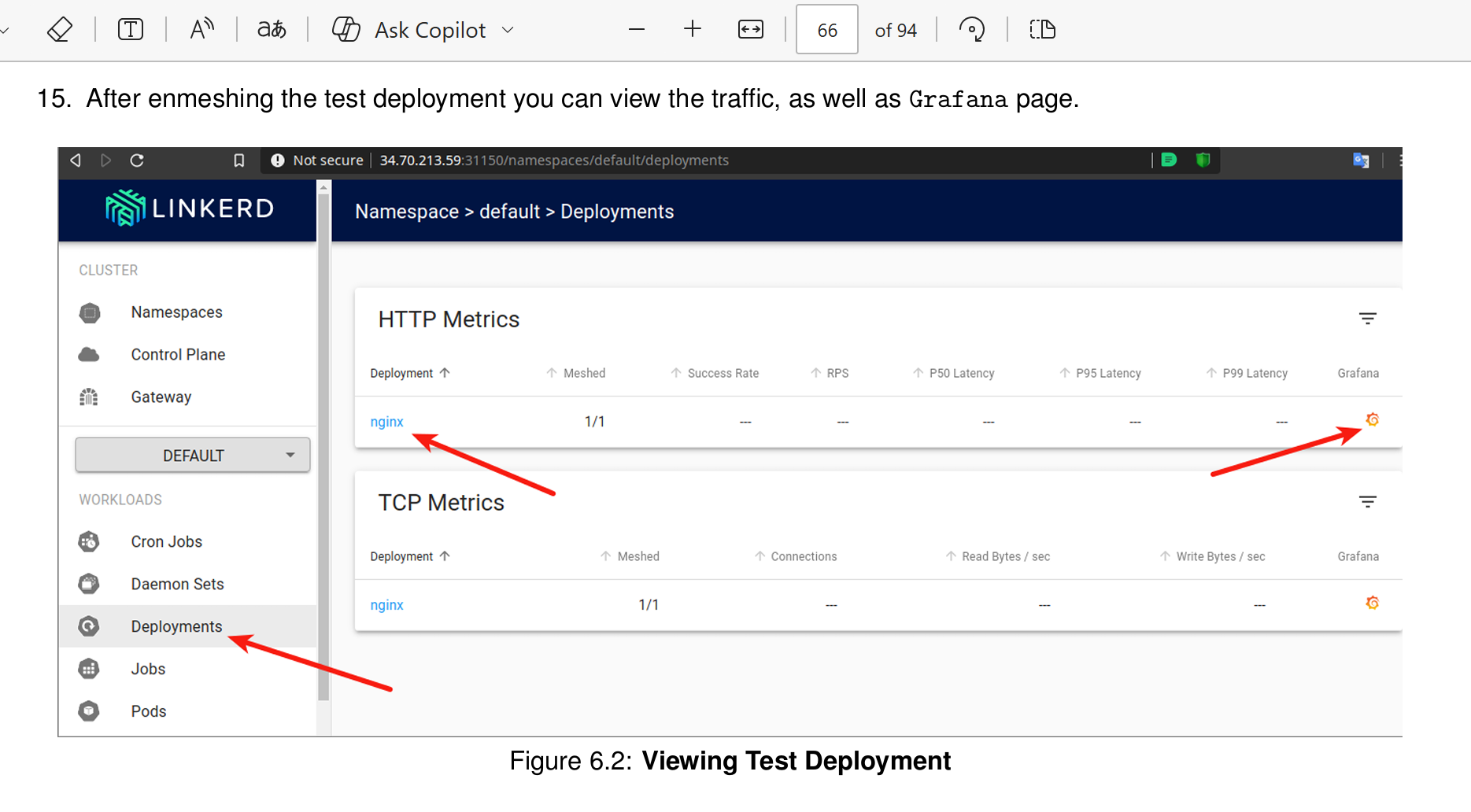
According to linkerd, it used to be the case that Grafana came pre-installed with linkerd-viz, but that is no longer the case:
In earlier versions of Linkerd, the viz extension also pre-installed a Grafana dashboard. As of Linkerd 2.12, due to licensing changes in Grafana, this is no longer the case.
Solution
Following the instructions on the linkerd webpage, I was able to install Grafana and also hook it to the Linkerd Viz Dashboard.
Simply at step 5 of the lab, we have to first run
helm repo add grafana https://grafana.github.io/helm-charts
helm install grafana -n grafana --create-namespace grafana/grafana \
  -f https://raw.githubusercontent.com/linkerd/linkerd2/main/grafana/values.yaml
in order to install Grafana into our cluster
and instead of the commandlinkerd viz install | kubectl apply -f -
we have to run the commandlinkerd viz install --set grafana.url=grafana.grafana | kubectl apply -f -
After that, we still have to run the other steps outlined in the lab in order to make the dashboard available again, such as
kubectl-n linkerd-viz edit svc web
kubectl-n linkerd-viz edit deployments.apps web
I recommend to update the lab instructions in order to incorporate this change in linkerd-viz.
Categories
- All Categories
- 179 LFX Mentorship
- 179 LFX Mentorship: Linux Kernel
- 776 Linux Foundation IT Professional Programs
- 384 Cloud Engineer IT Professional Program
- 175 Advanced Cloud Engineer IT Professional Program
- 76 DevOps IT Professional Program - Discontinued
- 7 DevOps & GitOps IT Professional Program
- 103 Cloud Native Developer IT Professional Program
- 7.7K Training Courses & Learning Paths
- 17 AI & ML Training
- 2 Blockchain & Decentralized Identity Training
- 44 Cloud & Containers Training
- 7 Cybersecurity Training
- 4 DevOps & Site-Reliability Training
- 3 Linux Kernel Development Training
- 2 Networking Training
- 2 Open Source Best Practice Training
- 6 System Administration Training
- 1 System Engineering Training
- 6 Web & Application Development Training
- 798 Hardware
- 202 Drivers
- 68 I/O Devices
- 37 Monitors
- 96 Multimedia
- 173 Networking
- 91 Printers & Scanners
- 92 Storage
- 774 Linux Distributions
- 82 Debian
- 68 Fedora
- 24 Linux Mint
- 13 Mageia
- 24 openSUSE
- 151 Red Hat Enterprise
- 32 Slackware
- 13 SUSE Enterprise
- 356 Ubuntu
- 473 Linux System Administration
- 31 Cloud Computing
- 73 Command Line/Scripting
- Github systems admin projects
- 104 Linux Security
- 79 Network Management
- 102 System Management
- 46 Web Management
- 174 Mobile Computing
- 32 Android
- 127 Development
- 1.2K New to Linux
- 1K Getting Started with Linux
- 407 Off Topic
- 128 Introductions
- 35 Study Material
- 1.1K Programming and Development
- 312 Kernel Development
- 729 Software Development
- 1K Software
- 421 Applications
- 183 Command Line
- 5 Compiling/Installing
- 71 Games
- 320 Installation
- Archived
- 183 Small Talk
- 2 LFD140 Class Forum
- 1.4K LFS258 Class Forum
Upcoming Training
-
August 20, 2018
Kubernetes Administration (LFS458)
-
August 20, 2018
Linux System Administration (LFS301)
-
August 27, 2018
Open Source Virtualization (LFS462)
-
August 27, 2018
Linux Kernel Debugging and Security (LFD440)