Why is it that..?

LFS207/chapter20/Disk Partitioning:
$ sudo blkid
Why is it that when i type that command, in ubuntu it works fine, but when i try that same comand on debian 12, i get the cannot find command output, although there is a man page, no matter if try with sudo or as root?
thanks and regards
berni
Best Answers
-
Hi Berni,
I downloaded and installed Debian 13.2 and I wasn't able to reproduce your issue, because it worked in my VM:
luis@debiansrv:~$ cat /etc/os-release
PRETTY_NAME="Debian GNU/Linux 13 (trixie)"
NAME="Debian GNU/Linux"
VERSION_ID="13"
VERSION="13 (trixie)"
VERSION_CODENAME=trixie
DEBIAN_VERSION_FULL=13.2
ID=debian
HOME_URL="https://www.debian.org/"
SUPPORT_URL="https://www.debian.org/support"
BUG_REPORT_URL="https://bugs.debian.org/"luis@debiansrv:~$ sudo blkid
[sudo] password for luis:
/dev/sda5: UUID="3e49a5e5-e453-481b-929a-a172e0372bba" TYPE="swap" PARTUUID="adca020b-05"
/dev/sda1: UUID="38aad7f6-0ea9-456b-b174-78d5224318cb" BLOCK_SIZE="4096" TYPE="ext4" PARTUUID="adca020b-01"luis@debiansrv:~$ which blkid
luis@debiansrv:~$ sudo which blkid
/usr/sbin/blkidluis@debiansrv:~$ apt search blkid
libblkid-dev/stable 2.41-5 amd64
block device ID library - headerslibblkid1/stable,now 2.41-5 amd64 [installed]
block device ID libraryThis was just to see which package is providing the binary.
So, in your case instead of using sudo, do the following:
luis@debiansrv:~$ su -
Password:
root@debiansrv:~# blkid
/dev/sda5: UUID="3e49a5e5-e453-481b-929a-a172e0372bba" TYPE="swap" PARTUUID="adca020b-05"
/dev/sda1: UUID="38aad7f6-0ea9-456b-b174-78d5224318cb" BLOCK_SIZE="4096" TYPE="ext4" PARTUUID="adca020b-01"In this case, using 'su -', we are running the root's shell with root's permissions, so you should be able to run it.
Please let me know.
Regards,
Luis.0 -
Hi Berni,
I think it's failing because it's not taking the root's PATH environment variable. So, when you do 'su', you get a login with the root user. When you do 'su -', you get a login with the root user with it's environment variables. So I guess you are just missing the root's PATH when you run the command.
Regards and happy New Year!
Luis.0 -
Hi Berni,
It's in the 'man su' page. Perhaps it's not so clear, but it also takes training and practice.
Thanks, happy New Year to you as well!!
Luis.
0

Answers
-
and here is the screenshot according the above question...
0 -
Hi Luis,
no it did not function according to the screenshot, what could be the reason?
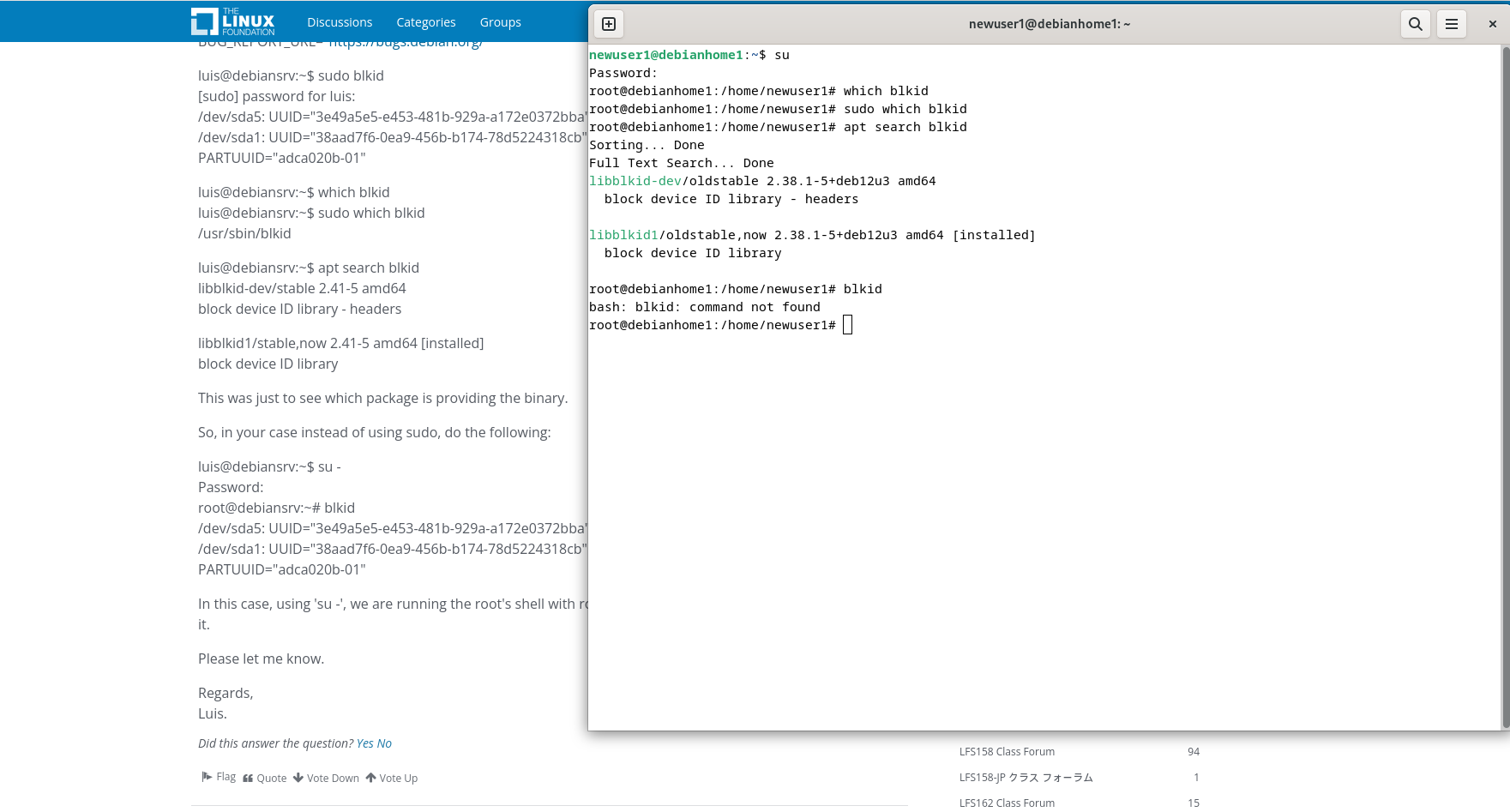
regards berni
0 -
Hi Luis,
thanks i did not know the difference between su and su - where can i find more information about that because in the lfs 101 and also at this course it was not explained yet but it solves some of my questions...thanks a lot and happy new year and regardsberni
1
Categories
- All Categories
- 179 LFX Mentorship
- 179 LFX Mentorship: Linux Kernel
- 776 Linux Foundation IT Professional Programs
- 384 Cloud Engineer IT Professional Program
- 175 Advanced Cloud Engineer IT Professional Program
- 76 DevOps IT Professional Program - Discontinued
- 7 DevOps & GitOps IT Professional Program
- 103 Cloud Native Developer IT Professional Program
- 7.7K Training Courses & Learning Paths
- 17 AI & ML Training
- 2 Blockchain & Decentralized Identity Training
- 44 Cloud & Containers Training
- 7 Cybersecurity Training
- 4 DevOps & Site-Reliability Training
- 3 Linux Kernel Development Training
- 2 Networking Training
- 2 Open Source Best Practice Training
- 6 System Administration Training
- 1 System Engineering Training
- 6 Web & Application Development Training
- 798 Hardware
- 202 Drivers
- 68 I/O Devices
- 37 Monitors
- 96 Multimedia
- 173 Networking
- 91 Printers & Scanners
- 92 Storage
- 774 Linux Distributions
- 82 Debian
- 68 Fedora
- 24 Linux Mint
- 13 Mageia
- 24 openSUSE
- 151 Red Hat Enterprise
- 32 Slackware
- 13 SUSE Enterprise
- 356 Ubuntu
- 473 Linux System Administration
- 31 Cloud Computing
- 73 Command Line/Scripting
- Github systems admin projects
- 104 Linux Security
- 79 Network Management
- 102 System Management
- 46 Web Management
- 174 Mobile Computing
- 32 Android
- 127 Development
- 1.2K New to Linux
- 1K Getting Started with Linux
- 407 Off Topic
- 128 Introductions
- 35 Study Material
- 1.1K Programming and Development
- 312 Kernel Development
- 729 Software Development
- 1K Software
- 421 Applications
- 183 Command Line
- 5 Compiling/Installing
- 71 Games
- 320 Installation
- Archived
- 183 Small Talk
- 2 LFD140 Class Forum
- 1.4K LFS258 Class Forum
Upcoming Training
-
August 20, 2018
Kubernetes Administration (LFS458)
-
August 20, 2018
Linux System Administration (LFS301)
-
August 27, 2018
Open Source Virtualization (LFS462)
-
August 27, 2018
Linux Kernel Debugging and Security (LFD440)