Deployment failure

I am trying to do the simpleapp deployment from exercise 3.2 and I am having an error.
I am doing the deployment on my master node and I have tried many things but nothing seems to work.

It seems there is something wrong with the tcp lookup of the local container registry. 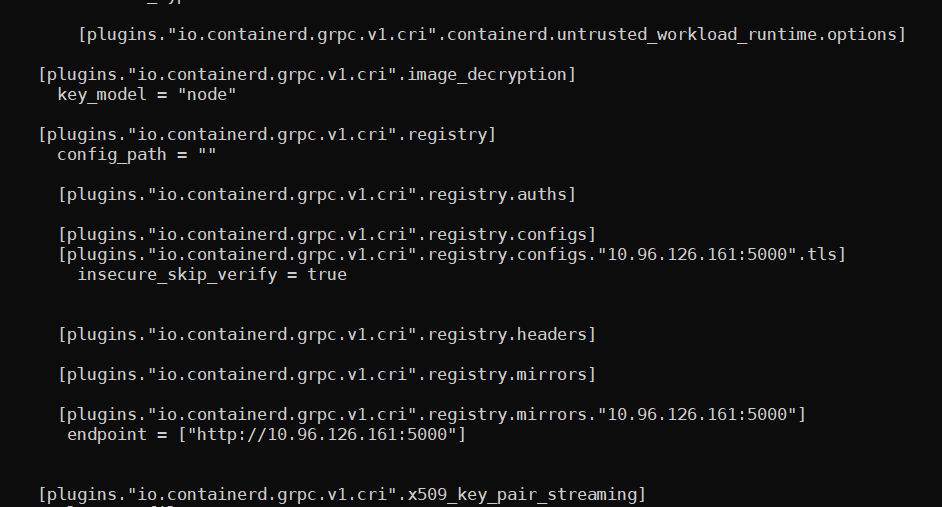
thats my config.toml

what am I missing? The nodes and containerd reboot also happened without any issues.
Best Answer
-
Hi @madhu91s,
On the worker you still have a typo to be fixed, on the same "endpoint" line, the port number should be ":5000". Your file has the port number incorrectly displayed as ".5000"
Please pay close attention and double check all your work before posting.
Regards,
-Chris1

Answers
-

FYI, the image is available though
0 -
I find this in the lab guide. Please make changes accordingly and verify once.
[plugins."io.containerd.grpc.v1.cri".registry.mirrors]
[plugins."io.containerd.grpc.v1.cri".registry.mirrors."*"] #<-- Add these two lines
endpoint = ["http://10.97.40.62:5000"] #<-- Remember YOUR IP hereAlso, ensure the service ip is same and also the pods are running. If possible, please paste the output of below command.
kubectl get all
0 -
@fazlur.khan said:
@madhu91sI find this in the lab guide. Please make changes accordingly and verify once.
[plugins."io.containerd.grpc.v1.cri".registry.mirrors]
[plugins."io.containerd.grpc.v1.cri".registry.mirrors."*"] #<-- Add these two lines
endpoint = ["http://10.97.40.62:5000"] #<-- Remember YOUR IP hereAlso, ensure the service ip is same and also the pods are running. If possible, please paste the output of below command.
kubectl get all
@falzur.khan thank you for your response, the lab guide instruction did not help me, so I made the changes as per here - https://forum.linuxfoundation.org/discussion/862401/lfd259-course-updated-to-v1-25-1-11-8-2022#latest
but that did not help either.
my output of kubectl get all looks like this -
 0
0 -
Hi @madhu91s,
I would take another look at the config.toml file and fix the indentation. What I can tell is that the "endpoint" line needs to be fixed, then restart the containerd service.
Regards,
-Chris0 -
@chrispokorni said:
Hi @madhu91s,I would take another look at the config.toml file and fix the indentation. What I can tell is that the "endpoint" line needs to be fixed, then restart the containerd service.
Regards,
-ChrisHi, I changed the indentation and validated it through a validator. It seems fine though but the problem still persists. I restarted containerd too.


 0
0 -
@chrispokorni said:
Hi @madhu91s,On the worker you still have a typo to be fixed, on the same "endpoint" line, the port number should be ":5000". Your file has the port number incorrectly displayed as ".5000"
Please pay close attention and double check all your work before posting.
Regards,
-ChrisThank you @chrispokorni, that indeed was the problem!
0

Categories
- All Categories
- 178 LFX Mentorship
- 178 LFX Mentorship: Linux Kernel
- 775 Linux Foundation IT Professional Programs
- 384 Cloud Engineer IT Professional Program
- 175 Advanced Cloud Engineer IT Professional Program
- 75 DevOps IT Professional Program - Discontinued
- 7 DevOps & GitOps IT Professional Program
- 103 Cloud Native Developer IT Professional Program
- 7.7K Training Courses & Learning Paths
- 13 AI & ML Training
- 1 Blockchain & Decentralized Identity Training
- 35 Cloud & Containers Training
- 3 Cybersecurity Training
- 3 DevOps & Site-Reliability Training
- 2 Linux Kernel Development Training
- 2 Networking Training
- 2 Open Source Best Practice Training
- 5 System Administration Training
- 1 System Engineering Training
- 6 Web & Application Development Training
- 798 Hardware
- 202 Drivers
- 68 I/O Devices
- 37 Monitors
- 96 Multimedia
- 173 Networking
- 91 Printers & Scanners
- 92 Storage
- 773 Linux Distributions
- 81 Debian
- 68 Fedora
- 24 Linux Mint
- 13 Mageia
- 24 openSUSE
- 151 Red Hat Enterprise
- 32 Slackware
- 13 SUSE Enterprise
- 356 Ubuntu
- 472 Linux System Administration
- 31 Cloud Computing
- 73 Command Line/Scripting
- Github systems admin projects
- 103 Linux Security
- 79 Network Management
- 102 System Management
- 46 Web Management
- 166 Mobile Computing
- 32 Android
- 119 Development
- 1.2K New to Linux
- 1K Getting Started with Linux
- 407 Off Topic
- 128 Introductions
- 35 Study Material
- 1.1K Programming and Development
- 311 Kernel Development
- 723 Software Development
- 1K Software
- 418 Applications
- 183 Command Line
- 5 Compiling/Installing
- 71 Games
- 320 Installation
- Archived
- 183 Small Talk
- 2 LFD140 Class Forum
- 1.4K LFS258 Class Forum
Upcoming Training
-
August 20, 2018
Kubernetes Administration (LFS458)
-
August 20, 2018
Linux System Administration (LFS301)
-
August 27, 2018
Open Source Virtualization (LFS462)
-
August 27, 2018
Linux Kernel Debugging and Security (LFD440)