Lab 3.2 Section 15

I am stuck on Section 15 of Lab 3.2. To verify if Simpleapp is running on second node using "sudo crictl ps". I first set up the crictl config by mistake. However I am getting the following error.
I know in cp I have 6 instance simpleapp deployed to, so I am not sure what this error means. "FATA[0000] validate service connection: CRI v1 runtime API is not implemented for endpoint "unix:///run/containerd/containerd.sock": rpc error: code = Unimplemented desc = unknown service runtime.v1.RuntimeService"

Best Answer
-
Hi @kenneth.kon001,
After a quick sanity testing I can confirm that the custom containerd config is preserved across several cp and worker node reboots. This assumes the custom config is applied only once, following the recommended sequence, after the local-repo-setup.sh has been executed only once. No other edits of config.toml are needed - even after several reboots - the custom entries are preserved.
Per my earlier edit, the repo/simpleapp image needs to be pushed again into the local registry (step 12 command #2), because the registry catalog is cleaned by the reboot. Without repopulating the registry catalog, the try1 Deployment's replicas will show ErrImagePull and CrashLoopBackOff status. After the image push, that populates the registry, the try1 replicas will eventually retrieve the image and reach the Running state.
Regards,
-Chris0

Answers
-
Hi @kenneth.kon001,
Your worker does not seem to host active workload. It is the same issue as before - misconfigured containerd runtime. Per the earlier discussion, apply the same solution on the worker node as well, to configure the containerd runtime, which then enables the crictl CLI.
Regards,
-Chris0 -
Weird, I thought I ran the process on Worker node. Let me try that. @chrispokorni I appreciate you messaging me back.
0 -
Alright, this is what I thought. I did follow the steps you mentioned. However when I do sudo reboot. It resets the config.toml. So I have to repeat the step.
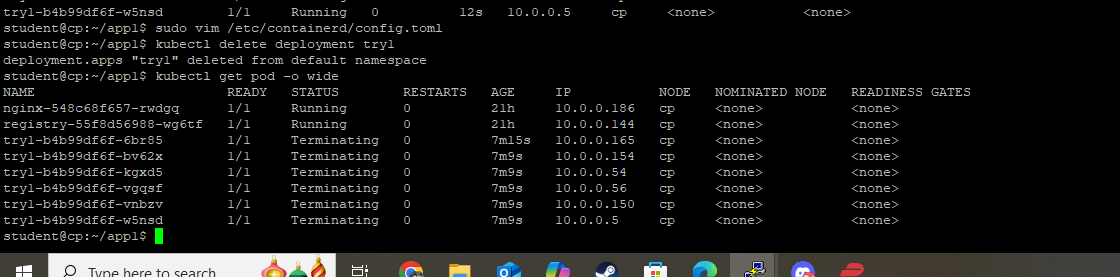
So I am running into problem, I can run "sudo crictl ps" however now I am not seeing the simpleapp container within the worker node. When I created the try deploying simpleapp in cp "kubectl create deployment try1 --image=$repo/simpleapp" the node its created with says cp instead of worker. Do you know what might be causing this issue?
 0
0 -
Hi @kenneth.kon001,
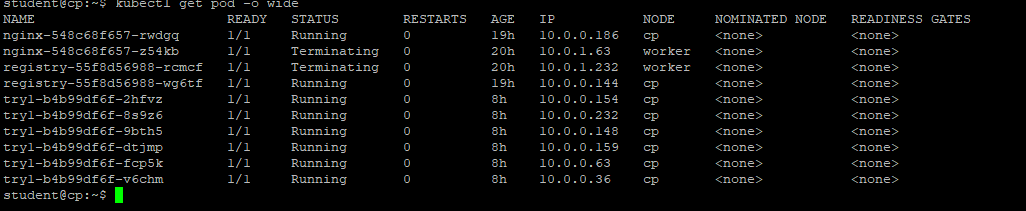
Your try1 Deployment's pod replicas are all hosted by the control plane node as a result of the scheduling process. I would expect some, but not necessarily all, of these six replicas to be scheduled onto the worker node also. If they are not scheduled onto the worker node may indicate an unreachable, unschedulable, or unhealthy worker node. Also, the "Terminating" status of all six replicas is not desired.
From your output, it seems your worker node is only hosting the three networking infrastructure pods. What is the state of your cluster overall? What output is produced by:
kubectl get nodes -o wide
kubectl get pods -A -o wide
I will take another look at the containerd configuration solution and check it against node reboots.
EDIT: The registry catalog is expected to be empty after a reboot. So a new simpleapp image push is necessary after a reboot in order to launch the try1 Deployment.
Regards,
-Chris0 -
Hi @chrispokorni,
Pushing the repo/simpleapp image into local registry did the trick. Thank you for the help. Hopefully I do not run into anymore weird bugs.
0
Categories
- All Categories
- 164 LFX Mentorship
- 164 LFX Mentorship: Linux Kernel
- 726 Linux Foundation IT Professional Programs
- 368 Cloud Engineer IT Professional Program
- 162 Advanced Cloud Engineer IT Professional Program
- 69 DevOps IT Professional Program - Discontinued
- 2 DevOps & GitOps IT Professional Program
- 94 Cloud Native Developer IT Professional Program
- 33 Express Training Courses & Microlearning
- 31 Express Courses - Discussion Forum
- 2 Microlearning - Discussion Forum
- 7.4K Training Courses
- 25 LFC110 Class Forum - Discontinued
- 15 LFC131 Class Forum - DISCONTINUED
- 54 LFD102 Class Forum
- 254 LFD103 Class Forum
- 1 LFD103-JP クラス フォーラム
- 17 LFD110 Class Forum
- LFD114 Class Forum
- 54 LFD121 Class Forum
- 3 LFD123 Class Forum
- 2 LFD125 Class Forum
- 3 LFD133 Class Forum
- 4 LFD134 Class Forum
- 4 LFD137 Class Forum
- 1 LFD140 Class Forum
- 66 LFD201 Class Forum
- 7 LFD210 Class Forum
- 3 LFD210-CN Class Forum
- 1 LFD213 Class Forum - Discontinued
- 1 LFD221 Class Forum
- 127 LFD232 Class Forum - Discontinued
- 2 LFD233 Class Forum - Discontinued
- 4 LFD237 Class Forum
- 24 LFD254 Class Forum
- 759 LFD259 Class Forum
- 110 LFD272 Class Forum - Discontinued
- 2 LFD272-JP クラス フォーラム - Discontinued
- 22 LFD273 Class Forum
- 660 LFS101 Class Forum
- 4 LFS111 Class Forum - Discontinued
- 2 LFS112 Class Forum
- LFS114 Class Forum
- 4 LFS116 Class Forum
- 6 LFS118 Class Forum
- 2 LFS120 Class Forum
- 1 LFS140 Class Forum
- 11 LFS142 Class Forum
- 9 LFS144 Class Forum
- 5 LFS145 Class Forum
- 6 LFS146 Class Forum
- 7 LFS147 Class Forum
- 26 LFS148 Class Forum
- 22 LFS151 Class Forum - Discontinued
- 4 LFS157 Class Forum
- 167 LFS158 Class Forum
- 1 LFS158-JP クラス フォーラム
- 17 LFS162 Class Forum
- 1 LFS166 Class Forum - Discontinued
- 8 LFS167 Class Forum
- 4 LFS170 Class Forum
- 1 LFS171 Class Forum - Discontinued
- 3 LFS178 Class Forum - Discontinued
- 3 LFS180 Class Forum
- 2 LFS182 Class Forum
- 6 LFS183 Class Forum
- 2 LFS184 Class Forum
- 42 LFS200 Class Forum
- 736 LFS201 Class Forum - Discontinued
- 2 LFS201-JP クラス フォーラム - Discontinued
- 23 LFS203 Class Forum
- 151 LFS207 Class Forum
- 2 LFS207-DE-Klassenforum
- 3 LFS207-JP クラス フォーラム
- 301 LFS211 Class Forum - Discontinued
- 55 LFS216 Class Forum - Discontinued
- 60 LFS241 Class Forum
- 51 LFS242 Class Forum
- 41 LFS243 Class Forum
- 18 LFS244 Class Forum
- 8 LFS245 Class Forum
- 1 LFS246 Class Forum
- 1 LFS248 Class Forum
- 165 LFS250 Class Forum
- 3 LFS250-JP クラス フォーラム
- 2 LFS251 Class Forum - Discontinued
- 164 LFS253 Class Forum
- 1 LFS254 Class Forum - Discontinued
- 3 LFS255 Class Forum
- 18 LFS256 Class Forum
- 2 LFS257 Class Forum
- 1.4K LFS258 Class Forum
- 12 LFS258-JP クラス フォーラム
- 149 LFS260 Class Forum
- 164 LFS261 Class Forum
- 45 LFS262 Class Forum
- 82 LFS263 Class Forum - Discontinued
- 15 LFS264 Class Forum - Discontinued
- 11 LFS266 Class Forum - Discontinued
- 25 LFS267 Class Forum
- 27 LFS268 Class Forum
- 38 LFS269 Class Forum
- 10 LFS270 Class Forum
- 202 LFS272 Class Forum - Discontinued
- 2 LFS272-JP クラス フォーラム - Discontinued
- 1 LFS274 Class Forum - Discontinued
- 4 LFS281 Class Forum - Discontinued
- 32 LFW111 Class Forum
- 265 LFW211 Class Forum - Discontinued
- 190 LFW212 Class Forum - Discontinued
- 18 SKF100 Class Forum
- 2 SKF200 Class Forum
- 3 SKF201 Class Forum
- 789 Hardware
- 202 Drivers
- 68 I/O Devices
- 37 Monitors
- 95 Multimedia
- 173 Networking
- 89 Printers & Scanners
- 86 Storage
- 764 Linux Distributions
- 81 Debian
- 67 Fedora
- 20 Linux Mint
- 13 Mageia
- 23 openSUSE
- 150 Red Hat Enterprise
- 31 Slackware
- 13 SUSE Enterprise
- 355 Ubuntu
- 460 Linux System Administration
- 31 Cloud Computing
- 72 Command Line/Scripting
- Github systems admin projects
- 95 Linux Security
- 78 Network Management
- 100 System Management
- 46 Web Management
- 70 Mobile Computing
- 18 Android
- 39 Development
- 1.2K New to Linux
- 1K Getting Started with Linux
- 381 Off Topic
- 117 Introductions
- 174 Small Talk
- 29 Study Material
- 735 Programming and Development
- 309 Kernel Development
- 408 Software Development
- 898 Software
- 291 Applications
- 182 Command Line
- 5 Compiling/Installing
- 68 Games
- 316 Installation
- 62 All In Program
- 62 All In Forum
Upcoming Training
-
August 20, 2018
Kubernetes Administration (LFS458)
-
August 20, 2018
Linux System Administration (LFS301)
-
August 27, 2018
Open Source Virtualization (LFS462)
-
August 27, 2018
Linux Kernel Debugging and Security (LFD440)