Issues getting worker node to join cluster in Lab3.2

As the title says - I'm having issues with the worker node in Lab 3.2.
I got the install finished successfully on the cp node. I am able to perform every step on the worker node up until the "kubeadm join" command. When I run the join command, it hangs on the following step:
[kubelet-start] Starting the kubelet
[kubelet-check] Waiting for a healthy kubelet at http://127.0.0.1:10248/healthz. This can take up to 4m0s
[kubelet-check] The kubelet is not healthy after 4m1.996320433s
When I look at "journalctl -xeu kubelet" for detailed errors, it tells me that conf files are missing/not found:
"Unhandled Error" err="unable to read existing bootstrap client config from /etc/kubernetes/kubelet.conf: invalid configuration
"command failed" err="failed to run Kubelet: unable to load bootstrap kubeconfig: stat /etc/kubernetes/bootstrap-kubelet.conf: no such file or directory"
Wouldn't it be expected behavior that the conf files are not there until after joining the cluster and receiving them from the cp? Are there steps missing in the lab instructions?
I am running the lab on local VMs. I can confirm that they have basic connectivity on all ports.
Thanks for the help!
Comments
-
Hi @vtvash,
The lab guide is complete with the steps necessary to successfully bootstrap a two node Kubernetes cluster.
However, the steps will fail if the Virtual environment is inadequate. VMs should have 2 vCPUs, 8 GB RAM, 20 GB vdisk (fully allocated), single bridged network interface, IP addresses that do not overlap 10.96.0.0/12 and 192.168.0.0/16 ranges. Guest OS Ubuntu 24.04 LTS. The hypervisor firewall should allow all incoming traffic from all sources, all protocols, to all ports (promiscuous mode enabled and set to allow-all).
What is the host OS and architecture? What hypervisor are you running? Is nested virtualization enabled?
Are there any work-related security controls active on your host?
Regards,
-Chris0 -
VMs meet the minimum requirements, are on a bridged network interface, use the correct RFC1918 sub-range (I don't see those /12 and /16 subnet ranges listed anywhere, but thankfully the addresses they have fit). The network policy is wide open.
All that being said, the error talks about a conf file on the local machine. Based on the pre-checks, it appears to be validating the local config before it even attempts network connectivity. Are the outputs a red herring? Is there anything else I can do to try to make it work? Do I just need to blow the VM away, start over, and hope that works?
0 -
Bumping this because I'm still having issues.
I went back and totally wiped out both VMs and started from scratch:
Host: Win11 Home running Oracle VirtualBox, host has 16 core CPU and 32GB RAM
VM specs:
-7680MB RAM, 2 cores, 25GB storage
-Nested virtualization enabled
-Bridged network adapter w/Promiscuous mode allow all
-IP tables set to ACCEPT across all policies
-each VM has a 192.168.1.x/24 RFC1918 IP
OS: Ubuntu-server-24.04.3I can confirm that both VMs are reachable from the host, and that the VMs can see/reach each other.
The kubernetes installation and kubeadm init commands all work fine on the cp, but when I try to join with the worker node, that's what fails.
I generate a fresh join token/command from the cp and then use it to try to join from the worker. Each time, the worker fails to "validate" because it can't find specific files.
kubelet[1232]: E1204 17:04:43.349077 1232 bootstrap.go:241] "Unhandled Error" err="unable to read existing bootstrap client config from /etc/kubernetes/kubelet.conf: invalid configuration: [unable to read client-cert /var/lib/kubelet/pki/kubelet-client-current.pem for default-auth
kubelet[1232]: E1204 17:04:43.350711 1232 run.go:72] "command failed" err="failed to run Kubelet: unable to load bootstrap kubeconfig: stat /etc/kubernetes/bootstrap-kubelet.conf: no such file or directory"
systemd[1]: kubelet.service: Main process exited, code=exited, status=1/FAILUREThere are no specific steps to copy or create these files on the worker node. Shouldn't these files come from the cp anyway? Is there some other dependency that is missing from local VMs that is being overlooked because cloud providers include/set it automatically?
0 -
Hi @vtvash,
There are no specific steps to copy or create these files on the worker node. Shouldn't these files come from the cp anyway? Is there some other dependency that is missing from local VMs that is being overlooked because cloud providers include/set it automatically?
The labs work as provided on cloud VMs and on local VMs (VirtualBox, KVM, Hyper-V, ...). No steps are necessary to copy config files from the control plane to the worker.
As mentioned earlier, overlapping RFC1918 IP ranges are not ideal, but first, let's get your cluster nodes joined, and worry about the container RFC1918 IP range later.
To determine the state of your VMs, please provide the following details.
Attach thekubeadm-init.outoutput file generated by thekubeadm initon your control plane node.
Also attach thekubeadm-config.yamlmanifest that is used bykubeadm init.
Provide thehostsfiles of the control plane and the worker VMs.For each VM, control plane and worker, provide the outputs of:
hostname -i
hostname -I
hostname -a
hostname -A
Provide the outputs of the following commands from the control plane VM. Capture the prompt (user@host), command, and output:
kubectl config view
kubectl get nodes -o wide
kubectl get pods -A -o wide
sudo kubeadm token create --print-join-command
Provide the outputs of the following commands from the worker VM. Capture the prompt (user@host), command, and output:
sudo kubeadm join ...
Regards,
-Chris0 -
Chris,
Here are the outputs you requested.
As info - I also included the iptables of the cp node in the "requested outputs" text file because I saw where the "kubectl get" commands returned some localhost connection refused messages. It looks like during the install there was a KUBE-FIREWALL category added to iptables that drops non-localhost sources trying hit localhost on the cp, but that seems correct to me.
Maybe these connection refused messages are expected when there are no actual nodes other than the cp, but I thought it might be helpful info.
Thanks for your help,
0 -
Hi @vtvash,
I can't seem to find the
hostsfiles in the attachments.Also, you seem to attempt to run
kubectlasroot. That is inconsistent with the lab guide, where a non-root user ID (studentfor the purpose of the lab guide) is the owner of.kube/configmanifest, and is enabled to runkubectlcommands.Regards,
-Chris0 -
So, I tried uploading the missing outputs here and it's saying I'm blocked. I guess something about my filenames triggered the site.
How can I get this resolved and/or send you the requested outputs?
0 -
Trying again:
My mistake, you're right, kubectl is not supposed to be run as root in the lab guides. All of the worker node installation steps and kubeadm join are though.
I'm attaching an updated file for those kubectl outputs from the cp.
0 -
Have you tried using the code block option in the text ribbon? It should allow you to share the output with the code block. Or you can share screenshots.
0 -
Ok - I guess it's flagging my attempts to put anything related to the hosts entries into my responses. Hopefully screenshots upload ok
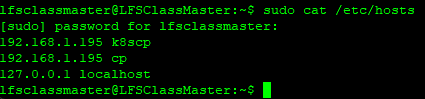
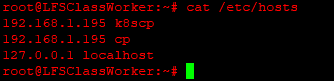 0
0 -
Hi @vtvash,
So far the
hosts, nodes, and the pods seem to be as expected.My first concern is the multi-IP assignment on the control plane VM - respectively 192.168.1.194 and .195. I recommend removing the extra interface. As mentioned earlier, a single bridged adapter is sufficient for this lab environment for all networking needs of the VM. Ensure the interface you keep is aliased by
k8scpand thehostsfiles of the control plane and worker VMs respectively.The second concern is the IP range overlap with the Pod network
192.168.0.0/16. To avoid this I strongly advise for a10.200.0.0/16or/24IP range for the VirtualBox VMs. Your current IP address schema will overlap with the Cilium managed Pod network causing conflicts and routing issues in your cluster.For the IP addresses to be corrected on the VMs, the Kubernetes nodes will need a reset to remove all Kubernetes configuration and clean-up each VM, as such:
sudo kubeadm resetOnce both nodes are reset, feel free to perform any network interface removal and IP address reassignment tasks that are necessary. Edit both
hostsfiles if necessary. Perform a newkubeadm initon the control plane VM. Upon completion, perform a connectivity check from the worker VM, withnetcat. Run the command once with thek8scpalias, and once with the IP address of the control plane VM. (Replace the sample IP 10.200.0.7 with you control plane VM IP).Run netcat with -zv on IP 10.200.0.7 port 6443
Run netcat with -zv on alias k8scp port 6443
[actual commands omitted to avoid getting blocked]If both connections success, then attempt to generate the
joincommand and execute it from the worker VM.Regards,
-Chris0 -
TL;DR - You were correct, the issue was caused by the IP conflict of my existing 192.168.1.0/24 host network with the default pod range of 192.168.0.0/16.
I deleted and re-created my VMs and modified the kubeadm-config.yaml and cilium-cni.yaml files to use 10.100.0.0/16 for the pod network range (to avoid conflicting with my current host network range). I realize this means I need to keep track of anything potentially referencing 192.168.0.0/16 to keep consistent, but it is what works best in my scenario.
Once I changed the pod IP range, everything worked as expected.
I thought that the fact that there were thousands of possible IPs between 192.168.0.0 and 192.168.1.0 would save me from IP conflicts. I was wrong
 lol. At least it was a good learning experience I suppose.
Thank you for all of your help,
0 -
Hi @vtvash,
While you resolved the issues caused by overlapping VM and Pod IP address ranges, at times you may see slightly ambiguous IP addresses being assigned between your Pods and your Services, as the selected Pod IP range overlaps slightly the default Service range - details also noted earlier in this thread.
Regards,
-Chris0 -
Thanks for the heads up.
Yeah, I noticed the 10.96.0.0/12 range later in the lab. There should be enough IPs available between 10.96 and 10.100 to give it plenty of space, but fingers crossed.
What is the recommended strategy for resizing a cluster? At an enterprise level I don't think many networks can support having an entire /12 dedicated to a "single" service. So, if you set an initial cluster IP range and need to grow it. Can that be done without resetting the entire cluster? I know tools like Ansible could help make re-creating the cluster faster, but still, you'd feel safer without having to totally tear down and rebuild.
Just curious.
Thanks again,
0 -
Hi @vtvash,
Understanding the implications of overlapping networks is extremely important for Kubernetes Administrators. This should drive the decision process for capacity planning and network segment sizing at the three levels - nodes, services, pods - all configurable at the time of cluster bootstrapping. Whether a /8, or a /12, or much smaller range is needed for either layer needs to be carefully determined. All your favorite RFC1918 IP ranges can be utilized to implement the multi-layer networking solution. A larger cluster (increased number of nodes) will require a larger Pod CIDR, typically /8, /12, or /16 to support the Pod CIDR subnets distribution among nodes.
Resetting the pod CIDR impacts your entire cluster, excepting the control plane components exposed on the host network, but not recommended on production clusters.
Regards,
-Chris0


Categories
- All Categories
- 164 LFX Mentorship
- 164 LFX Mentorship: Linux Kernel
- 724 Linux Foundation IT Professional Programs
- 368 Cloud Engineer IT Professional Program
- 161 Advanced Cloud Engineer IT Professional Program
- 69 DevOps IT Professional Program - Discontinued
- 1 DevOps & GitOps IT Professional Program
- 94 Cloud Native Developer IT Professional Program
- 33 Express Training Courses & Microlearning
- 31 Express Courses - Discussion Forum
- 2 Microlearning - Discussion Forum
- 7.4K Training Courses
- 25 LFC110 Class Forum - Discontinued
- 15 LFC131 Class Forum - DISCONTINUED
- 54 LFD102 Class Forum
- 254 LFD103 Class Forum
- 1 LFD103-JP クラス フォーラム
- 17 LFD110 Class Forum
- LFD114 Class Forum
- 54 LFD121 Class Forum
- 3 LFD123 Class Forum
- 2 LFD125 Class Forum
- 3 LFD133 Class Forum
- 4 LFD134 Class Forum
- 4 LFD137 Class Forum
- 1 LFD140 Class Forum
- 66 LFD201 Class Forum
- 7 LFD210 Class Forum
- 3 LFD210-CN Class Forum
- 1 LFD213 Class Forum - Discontinued
- 1 LFD221 Class Forum
- 127 LFD232 Class Forum - Discontinued
- 2 LFD233 Class Forum - Discontinued
- 4 LFD237 Class Forum
- 24 LFD254 Class Forum
- 759 LFD259 Class Forum
- 110 LFD272 Class Forum - Discontinued
- 2 LFD272-JP クラス フォーラム - Discontinued
- 22 LFD273 Class Forum
- 657 LFS101 Class Forum
- 4 LFS111 Class Forum - Discontinued
- 2 LFS112 Class Forum
- LFS114 Class Forum
- 4 LFS116 Class Forum
- 6 LFS118 Class Forum
- 2 LFS120 Class Forum
- 1 LFS140 Class Forum
- 11 LFS142 Class Forum
- 9 LFS144 Class Forum
- 5 LFS145 Class Forum
- 6 LFS146 Class Forum
- 7 LFS147 Class Forum
- 26 LFS148 Class Forum
- 22 LFS151 Class Forum - Discontinued
- 4 LFS157 Class Forum
- 167 LFS158 Class Forum
- 1 LFS158-JP クラス フォーラム
- 17 LFS162 Class Forum
- 1 LFS166 Class Forum - Discontinued
- 8 LFS167 Class Forum
- 4 LFS170 Class Forum
- 1 LFS171 Class Forum - Discontinued
- 3 LFS178 Class Forum - Discontinued
- 3 LFS180 Class Forum
- 2 LFS182 Class Forum
- 6 LFS183 Class Forum
- 2 LFS184 Class Forum
- 42 LFS200 Class Forum
- 736 LFS201 Class Forum - Discontinued
- 2 LFS201-JP クラス フォーラム - Discontinued
- 23 LFS203 Class Forum
- 151 LFS207 Class Forum
- 2 LFS207-DE-Klassenforum
- 3 LFS207-JP クラス フォーラム
- 301 LFS211 Class Forum - Discontinued
- 55 LFS216 Class Forum - Discontinued
- 60 LFS241 Class Forum
- 51 LFS242 Class Forum
- 41 LFS243 Class Forum
- 18 LFS244 Class Forum
- 8 LFS245 Class Forum
- 1 LFS246 Class Forum
- 1 LFS248 Class Forum
- 164 LFS250 Class Forum
- 3 LFS250-JP クラス フォーラム
- 2 LFS251 Class Forum - Discontinued
- 164 LFS253 Class Forum
- 1 LFS254 Class Forum - Discontinued
- 3 LFS255 Class Forum
- 18 LFS256 Class Forum
- 2 LFS257 Class Forum
- 1.4K LFS258 Class Forum
- 12 LFS258-JP クラス フォーラム
- 149 LFS260 Class Forum
- 164 LFS261 Class Forum
- 45 LFS262 Class Forum
- 82 LFS263 Class Forum - Discontinued
- 15 LFS264 Class Forum - Discontinued
- 11 LFS266 Class Forum - Discontinued
- 25 LFS267 Class Forum
- 27 LFS268 Class Forum
- 38 LFS269 Class Forum
- 10 LFS270 Class Forum
- 202 LFS272 Class Forum - Discontinued
- 2 LFS272-JP クラス フォーラム - Discontinued
- 1 LFS274 Class Forum - Discontinued
- 4 LFS281 Class Forum - Discontinued
- 32 LFW111 Class Forum
- 265 LFW211 Class Forum - Discontinued
- 190 LFW212 Class Forum - Discontinued
- 18 SKF100 Class Forum
- 2 SKF200 Class Forum
- 3 SKF201 Class Forum
- 789 Hardware
- 202 Drivers
- 68 I/O Devices
- 37 Monitors
- 95 Multimedia
- 173 Networking
- 89 Printers & Scanners
- 86 Storage
- 764 Linux Distributions
- 81 Debian
- 67 Fedora
- 20 Linux Mint
- 13 Mageia
- 23 openSUSE
- 150 Red Hat Enterprise
- 31 Slackware
- 13 SUSE Enterprise
- 355 Ubuntu
- 459 Linux System Administration
- 31 Cloud Computing
- 72 Command Line/Scripting
- Github systems admin projects
- 94 Linux Security
- 78 Network Management
- 100 System Management
- 46 Web Management
- 67 Mobile Computing
- 18 Android
- 38 Development
- 1.2K New to Linux
- 1K Getting Started with Linux
- 381 Off Topic
- 117 Introductions
- 174 Small Talk
- 29 Study Material
- 731 Programming and Development
- 309 Kernel Development
- 404 Software Development
- 893 Software
- 286 Applications
- 182 Command Line
- 5 Compiling/Installing
- 68 Games
- 316 Installation
- 62 All In Program
- 62 All In Forum
Upcoming Training
-
August 20, 2018
Kubernetes Administration (LFS458)
-
August 20, 2018
Linux System Administration (LFS301)
-
August 27, 2018
Open Source Virtualization (LFS462)
-
August 27, 2018
Linux Kernel Debugging and Security (LFD440)